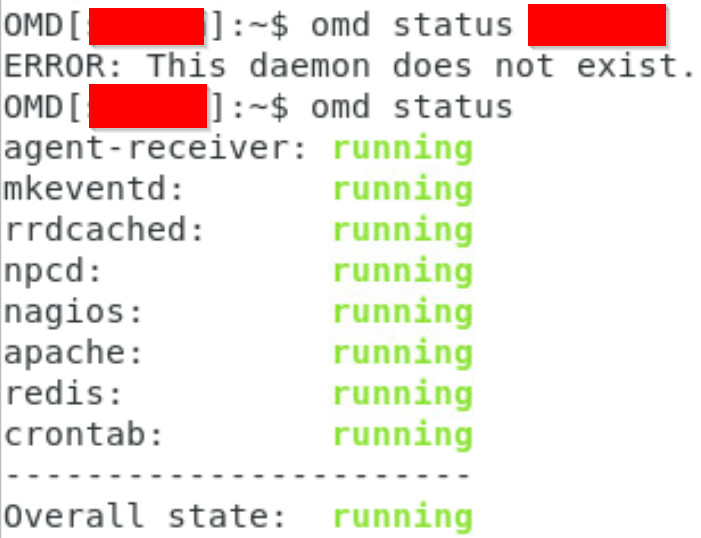
When I put into this command: cmk-update-config -vvv
I get this error code:
cmk-update-config -vvv
Traceback (most recent call last):
  File "/omd/sites/sitename/bin/cmk-update-config", line 8, in <module>
    from cmk.update_config.main import main
  File "/omd/sites/sitename/lib/python3/cmk/update_config/main.py", line 33, in <module>
    from cmk.gui import main_modules
  File "/omd/sites/sitename/lib/python3/cmk/gui/main_modules.py", line 24, in <module>
    import cmk.gui.plugins.main_modules  # pylint: disable=no-name-in-module,unused-import
    ^^^^^^^^^^^^^^^^^^^^^^^^^^^^^^^^^^^
  File "/omd/sites/sitename/lib/python3/cmk/gui/plugins/main_modules/__init__.py", line 8, in <module>
    load_plugins(__file__, __package__)
  File "/omd/sites/sitename/lib/python3/cmk/utils/plugin_loader.py", line 124, in load_plugins
    importlib.import_module(f"{package_name}.{plugin_name}")
  File "/omd/sites/sitename/lib/python3.11/importlib/__init__.py", line 126, in import_module
    return _bootstrap._gcd_import(name[level:], package, level)
           ^^^^^^^^^^^^^^^^^^^^^^^^^^^^^^^^^^^^^^^^^^^^^^^^^^^^
  File "/omd/sites/sitename/lib/python3/cmk/gui/plugins/main_modules/cre.py", line 13, in <module>
    import cmk.gui.dashboard
  File "/omd/sites/sitename/lib/python3/cmk/gui/dashboard/__init__.py", line 23, in <module>
    from .cre_dashboards import register_builtin_dashboards
  File "/omd/sites/sitename/lib/python3/cmk/gui/dashboard/cre_dashboards.py", line 13, in <module>
    from .dashlet import LinkedViewDashletConfig, StatsDashletConfig, ViewDashletConfig
  File "/omd/sites/sitename/lib/python3/cmk/gui/dashboard/dashlet/__init__.py", line 16, in <module>
    from .dashlets import (
  File "/omd/sites/sitename/lib/python3/cmk/gui/dashboard/dashlet/dashlets/__init__.py", line 8, in <module>
    from .failed_notifications import FailedNotificationsDashlet
  File "/omd/sites/sitename/lib/python3/cmk/gui/dashboard/dashlet/dashlets/failed_notifications.py", line 6, in <module>
    import cmk.gui.notifications as notifications
  File "/omd/sites/sitename/lib/python3/cmk/gui/notifications.py", line 42, in <module>
    from cmk.gui.wato.pages.user_profile.async_replication import user_profile_async_replication_page
  File "/omd/sites/sitename/lib/python3/cmk/gui/wato/__init__.py", line 66, in <module>
    import cmk.gui.backup as backup
  File "/omd/sites/sitename/lib/python3/cmk/gui/backup.py", line 32, in <module>
    from cmk.utils.backup.targets.aws_s3_bucket import S3Bucket, S3Target
  File "/omd/sites/sitename/lib/python3/cmk/utils/backup/targets/aws_s3_bucket.py", line 10, in <module>
    import boto3  # type: ignore[import]
    ^^^^^^^^^^^^
  File "/omd/sites/sitename/lib/python3.11/site-packages/boto3/__init__.py", line 16, in <module>
    from boto3.session import Session
  File "/omd/sites/sitename/lib/python3.11/site-packages/boto3/session.py", line 17, in <module>
    import botocore.session
  File "/omd/sites/sitename/lib/python3.11/site-packages/botocore/session.py", line 30, in <module>
    import botocore.credentials
  File "/omd/sites/sitename/lib/python3.11/site-packages/botocore/credentials.py", line 34, in <module>
    from botocore.config import Config
  File "/omd/sites/sitename/lib/python3.11/site-packages/botocore/config.py", line 16, in <module>
    from botocore.endpoint import DEFAULT_TIMEOUT, MAX_POOL_CONNECTIONS
  File "/omd/sites/sitename/lib/python3.11/site-packages/botocore/endpoint.py", line 22, in <module>
    from botocore.awsrequest import create_request_object
  File "/omd/sites/sitename/lib/python3.11/site-packages/botocore/awsrequest.py", line 26, in <module>
    import botocore.utils
  File "/omd/sites/sitename/lib/python3.11/site-packages/botocore/utils.py", line 33, in <module>
    import botocore.httpsession
  File "/omd/sites/sitename/lib/python3.11/site-packages/botocore/httpsession.py", line 9, in <module>
    from urllib3.util.ssl_ import (
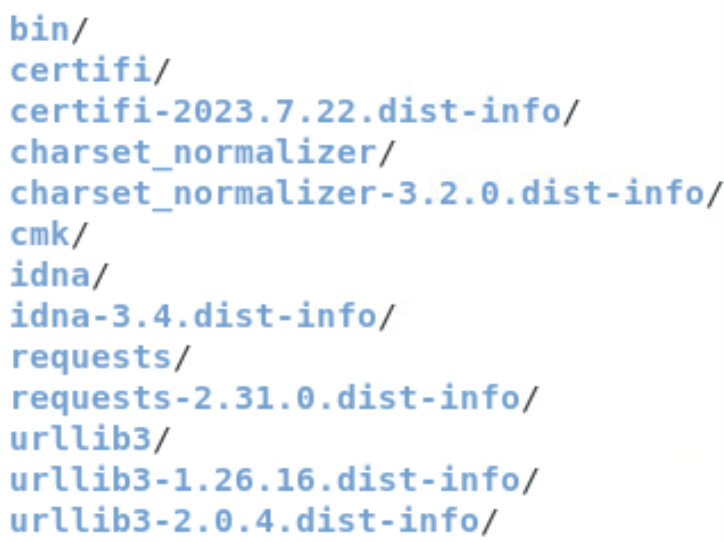
ImportError: cannot import name 'DEFAULT_CIPHERS' from 'urllib3.util.ssl_' (/omd/sites/sitename/local/lib/python3/urllib3/util/ssl_.py)