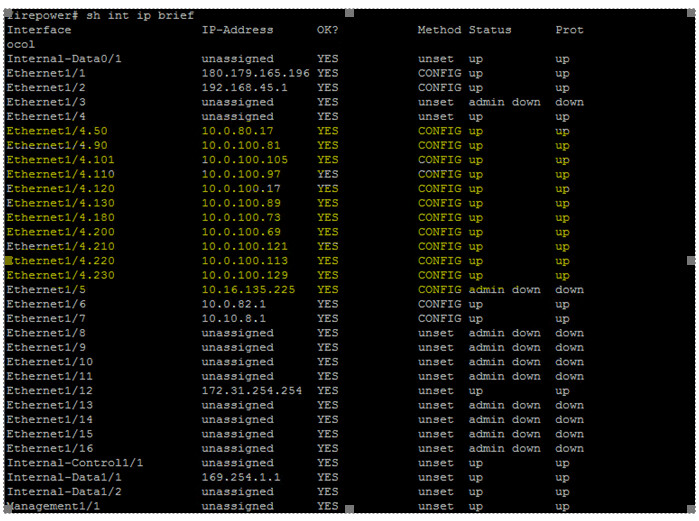
Hi Team,
Unable to monitor MPLS / sub interface Interface port for device Cisco FirePOWER FPR-2140
Has anyone faced this issue… request for yr support.
Hi Team,
Unable to monitor MPLS / sub interface Interface port for device Cisco FirePOWER FPR-2140
Has anyone faced this issue… request for yr support.
Hi,
did you activate the MPLS port in switch port discovery? I think the port type is 166.
Cheers,
Christian
As addition to @ChristianM if you don’t know the port type it would be good to activate the Hardware/Software inventory. There you get the list of all ports found on the device and also you see the port type of every port. Then you can select what port types you want.
Dear Andres,
Under Hardware/Software inventory we have enabled all port for the device still its not discovering.
If you enable HW/SW inventory you will only get a smaller or bigger port table and this table shows all interfaces your device has irrelevant if you monitor it or not. There you cannot enable any port types.
Can you show the rule and result?
The sub-interfaces from your screenshot must be visible inside the HW/SW inventory table.
This topic was automatically closed 365 days after the last reply. New replies are no longer allowed. Contact @fayepal if you think this should be re-opened.