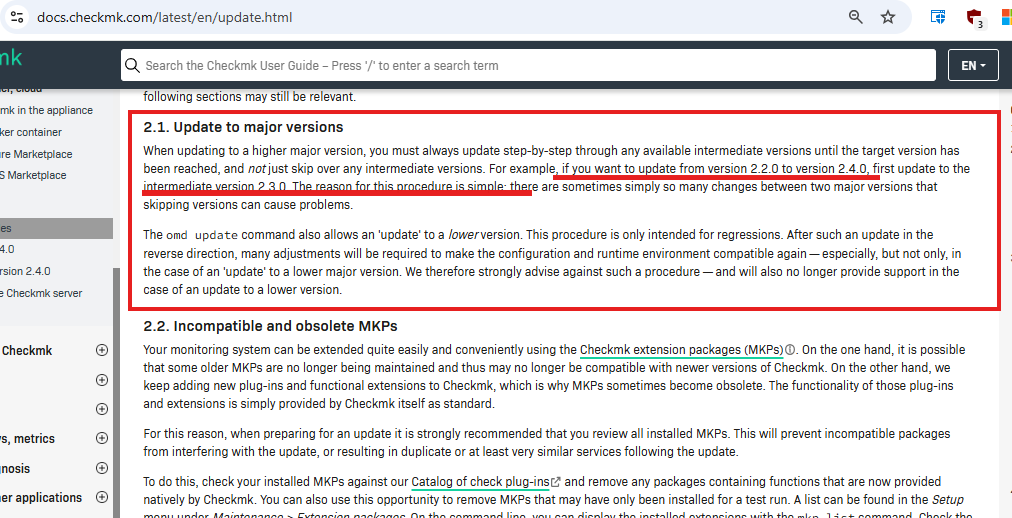
We are currently using version 2.2.0p9.cee on Rocky Linux 9. What steps are required to upgrade to 2.4.0p14.cee?
I noticed there are several intermediate versions, such as 2.2.0p10 → 2.2.0p46 → 2.3.0 → 2.4.0p14.
Do we need to install all these intermediate versions sequentially, or can we upgrade directly to 2.4.0p14 using the RPM package?
Thank you for the clarification. Based on the Checkmk documentation, could you please confirm the correct upgrade path?
To upgrade from 2.2.0p9.cee to 2.4.0p14.cee, do we first need to update to 2.3.0.cee and then proceed to 2.4.0p14.cee?
Or do we have to install each intermediate patch version (e.g., 2.2.0p10, 2.2.0p11, and so on) sequentially up to 2.4.0p14.cee?
To my understanding the step from 2.2.0p10 → 2.2.0p46 can be skipped. Is that wrong?
I thought you can update from any 2.2.0 version to any 2.3.0 version (preferably to the latest) and then to any/the latest 2.4.0 version. You cannot skip the 2.3.0 step, though.
I’m still not entirely clear — do we need to upgrade sequentially through each version, like this: 2.2.0p10 → p11 → p12 → … → p46, then 2.3.0 → p1 → p2 → … → p39, and finally 2.4.0 → p1 → p2 → … → p14?
Update to the latest 2.2.0pX, then to the latest 2.3.0pY and then to the latest 2.4.0pZ. I will go through the update articles and check where more clarification is needed.
When combining Checkmk updates with distribution version upgrades, check out the update matrix (here the one for 2.2 to 2.3): Update matrix for version 2.3.0
Hi CFriedrich]
Do you mean i need to install 2.2.0p46 first then 2.3.0p39 and then 2.4.0p14 ?because they are the latest as per my understanding.
and not to follow each version as below sequence one by one? 2.2.0p10 → p11 → p12 → … → p46 , then 2.3.0 → p1 → p2 → … → p39 , and finally 2.4.0 → p1 → p2 → … → p14 ?
Update to the latest 2.2.0pX, then to the latest 2.3.0pY and then to the latest 2.4.0pZ. I will go through the update articles and check where more clarification is needed.
so one by one version update like below is not needed ? 2.2.0p10 → p11 → p12 → … → p46 , then 2.3.0 → p1 → p2 → … → p39 , and finally 2.4.0 → p1 → p2 → … → p14 ?
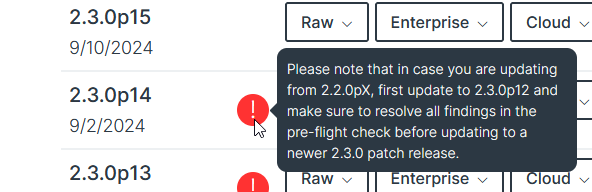
If I remember correctly, there was a bug in 2.3.0p13 and p14 that in some cases when updating from any earlier Checkmk caused the pre-flight check to be non-interactive. This was fixed in p15.
Thank you for the clarification.
So, this rule applies to all updates ? — meaning, for example, if we are currently on version 2.4.0p3 and want to upgrade to 2.4.0p9, we can directly apply 2.4.0p9 instead of updating sequentially through 2.4.0p4 → 2.4.0p5 → 2.4.0p6 → 2.4.0p7 → 2.4.0p8 → 2.4.0p9 one by one.
correct, there is and never was a reason to update through every minor patch release, if there are versions to be taken in between, checkmk will tell you during the update process.
You probably want to target 2.4.0.p13 rather than p14 due to the newly-discovered BI issues with the latter… from the download site for p14 “In this patch, several core BI functionalities are broken”