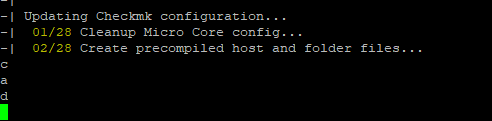
Error message:
For background, a standalone site updated fine.
This occurrence happened with a central site and the distributed node under it.
No error, just halts at this point. Waited 30 minutes before aborting.
I thought perhaps it was a plugin but this particular instance only has the 3rd party bgp_peer from the plugin exchange along with the Cisco, Arista and Juniper companion items. I had already staged the 2.3 bgp_peer plugin.
I retried a 2nd time with all of those plugins disabled with the same result after waiting 30 minutes.
I retried a 3rd time with all plugins deleted with the same result after waiting 10 minutes.
2024-09-03 04:17:12 - Updating site 'testsys' from version 2.2.0p32.cme to 2.3.0p13.cme...

 * Installed dir  etc/default
 * Updated        etc/check_mk/apache.conf
 * Installed file etc/default/cmc
 * Updated        etc/init.d/agent-receiver
 * Updated        etc/init.d/apache
 * Updated        etc/init.d/cmc
 * Installed file etc/logrotate.d/audit
 * Installed file etc/logrotate.d/security
 * Updated        etc/mk-livestatus/nagios.cfg
 * Updated        etc/nagios/conf.d/check_mk_templates.cfg
 * Updated        etc/nagvis/apache.conf
 * Updated        etc/ssl/openssl.cnf
 * Updated        etc/ssl/openssl.cnf.dist
 * Updated        etc/ssl/misc/CA.pl
 * Identical      etc/ssl/misc/tsget
 * Updated        etc/ssl/misc/tsget.pl
 * Installed dir  etc/ssl/saml2/builtin/encryption
 * Installed dir  local/lib/python3/cmk_addons
 * Installed dir  local/lib/python3/cmk/plugins
 * Installed dir  local/lib/python3/cmk_addons/plugins
 * Vanished       etc/cron.d/cmk_discovery
Creating temporary filesystem /omd/sites/testsys/tmp...OK
Wondering if there is activity going on that perhaps I am not seeing.
If so, could a progress meter be added to show some sort of activity? (even dots would be fine with me)
If not, what troubleshooting or information can I collect to try to isolated a cause.
I have another central server and distributed node that I need to update and it also did this but it has many more devices and extensions in use. I thought it was related to the custom plugins but haven’t isolated anything yet.
@chauhan_sudhir, thank you for directing me to this. I can confirm that in my specific case, this is related to the bgp_peer extension from the exchange if I hit enter after waiting a few minutes.
Creating temporary filesystem /omd/sites/testsys/tmp...OK
<ENTER>

ATTENTION
  Some steps may take a long time depending on your installation.
  Please be patient.

Cleanup precompiled host and folder files
Verifying Checkmk configuration...
Failed to load plug-in /omd/sites/testsys/local/share/check_mk/web/plugins/views/inv_bgp_peer.py: No module named 'cmk.gui.plugins.visuals.inventory'
Traceback (most recent call last):
  File "/omd/sites/testsys/lib/python3/cmk/gui/utils/__init__.py", line 67, in load_web_plugins
    exec(
  File "/omd/sites/testsys/local/share/check_mk/web/plugins/views/inv_bgp_peer.py", line 5, in <module>
    from cmk.gui.plugins.visuals.inventory import (
ModuleNotFoundError: No module named 'cmk.gui.plugins.visuals.inventory'
Failed to load plug-in /omd/sites/testsys/local/share/check_mk/web/plugins/views/inv_bgp_peer.py: No module named 'cmk.gui.plugins.visuals.inventory'
Traceback (most recent call last):
  File "/omd/sites/testsys/lib/python3/cmk/gui/utils/__init__.py", line 67, in load_web_plugins
    exec(
  File "/omd/sites/testsys/local/share/check_mk/web/plugins/views/inv_bgp_peer.py", line 5, in <module>
    from cmk.gui.plugins.visuals.inventory import (
ModuleNotFoundError: No module named 'cmk.gui.plugins.visuals.inventory'
 01/06 Legacy check plug-ins...
 02/06 Rulesets...
 03/06 UI extensions...
Failed to load plug-in /omd/sites/testsys/local/share/check_mk/web/plugins/views/inv_bgp_peer.py: No module named 'cmk.gui.plugins.visuals.inventory'
Traceback (most recent call last):
  File "/omd/sites/testsys/lib/python3/cmk/gui/utils/__init__.py", line 67, in load_web_plugins
    exec(
  File "/omd/sites/testsys/local/share/check_mk/web/plugins/views/inv_bgp_peer.py", line 5, in <module>
    from cmk.gui.plugins.visuals.inventory import (
ModuleNotFoundError: No module named 'cmk.gui.plugins.visuals.inventory'
Incompatible file '/omd/sites/testsys/local/share/check_mk/web/plugins/views/inv_bgp_peer.py' of extension package 'bgp_peer 2.2.4-20240607'
Error: No module named 'cmk.gui.plugins.visuals.inventory'


You can abort the update process (A) or disable the extension package (d) and continue the update process.
Abort the update process? [A/d]

Update aborted with Error: incompatible extension package.
Your site has not been modified.
The update can be retried after the error has been fixed.
In this case, I have both 2.2 and 2.3 compatible releases installed so I’m not sure what the appropriate behavior should be for the pre-flight check.
OMD[testsys]:~$ mkp list
Name             Version        Title            Author                             Req. Version Until Version Files State
---------------- -------------- ---------------- ---------------------------------- ------------ ------------- ----- -------------------------------
arista_bgp_peer  1.0.0-20230613 Arista BGP peer  Th.L. (thl-cmk[at]outlook[dot]com) 2.0.0b1      None          3     Enabled (active on this site)
bgp_peer         2.2.4-20240607 BGP Peer         Th.L. (thl-cmk[at]outlook[dot]com) 2.2.0b1      2.3.0b1       8     Enabled (active on this site)
cisco_bgp_peer   1.0.0-20230613 Cisco BGP Peer   Th.L. (thl-cmk[at]outlook[dot]com) 2.0.0b1      None          2     Enabled (active on this site)
juniper_bgp_peer 1.0.0-20230613 Juniper BGP peer Th.L. (thl-cmk[at]outlook[dot]com) 2.0.0b1      None          3     Enabled (active on this site)
bgp_peer         2.2.5-20240615 BGP Peer         Th.L. (thl-cmk[at]outlook[dot]com) 2.3.0b1      2.4.0b1       8     Enabled (inactive on this site)
At the moment i would recommend to use 2.3.0p12 to update from an earlier version. Here you see all messages and can fix the problems.
If the system is problem free you can update then to p14
@andreas-doehler, thank you for the advice.
Using 2.3.0p10 and was able to interact with the install prompts.
It didn’t automatically disable the outdated bgp_peer but I was able to (c)ontinue past that and then opt to (d)isable it further down. Further along, it picked up the newer 2.3 compatible bgp_peer plugin and completed.
Creating temporary filesystem /omd/sites/testsys/tmp...OK
ATTENTION
  Some steps may take a long time depending on your installation.
  Please be patient.

Cleanup precompiled host and folder files
Verifying Checkmk configuration...
Failed to load plug-in /omd/sites/testsys/local/share/check_mk/web/plugins/views/inv_bgp_peer.py: No module named 'cmk.gui.plugins.visuals.inventory'
Traceback (most recent call last):
  File "/omd/sites/testsys/lib/python3/cmk/gui/utils/__init__.py", line 67, in load_web_plugins
    exec(
  File "/omd/sites/testsys/local/share/check_mk/web/plugins/views/inv_bgp_peer.py", line 5, in <module>
    from cmk.gui.plugins.visuals.inventory import (
ModuleNotFoundError: No module named 'cmk.gui.plugins.visuals.inventory'
Failed to load plug-in /omd/sites/testsys/local/share/check_mk/web/plugins/views/inv_bgp_peer.py: No module named 'cmk.gui.plugins.visuals.inventory'
Traceback (most recent call last):
  File "/omd/sites/testsys/lib/python3/cmk/gui/utils/__init__.py", line 67, in load_web_plugins
    exec(
  File "/omd/sites/testsys/local/share/check_mk/web/plugins/views/inv_bgp_peer.py", line 5, in <module>
    from cmk.gui.plugins.visuals.inventory import (
ModuleNotFoundError: No module named 'cmk.gui.plugins.visuals.inventory'
 01/06 Legacy check plug-ins...
 02/06 Rulesets...
 03/06 UI extensions...
Failed to load plug-in /omd/sites/testsys/local/share/check_mk/web/plugins/views/inv_bgp_peer.py: No module named 'cmk.gui.plugins.visuals.inventory'
Traceback (most recent call last):
  File "/omd/sites/testsys/lib/python3/cmk/gui/utils/__init__.py", line 67, in load_web_plugins
    exec(
  File "/omd/sites/testsys/local/share/check_mk/web/plugins/views/inv_bgp_peer.py", line 5, in <module>
    from cmk.gui.plugins.visuals.inventory import (
ModuleNotFoundError: No module named 'cmk.gui.plugins.visuals.inventory'
Incompatible file '/omd/sites/testsys/local/share/check_mk/web/plugins/views/inv_bgp_peer.py' of extension package 'bgp_peer 2.2.4-20240607'
Error: No module named 'cmk.gui.plugins.visuals.inventory'


You can abort the update process (A) or disable the extension package (d) and continue the update process.
Abort the update process? [A/d]
d
Disabled extension package: bgp_peer 2.2.4-20240607
 04/06 Agent based plugins...
 05/06 Autochecks...
 06/06 Deprecated .mk configuration of plugins...
Done (success)


Completed verifying site configuration. Your site now has version 2.3.0p10.cme.
Executing update-pre-hooks script "01_init_state_creation.py"...OK
Executing update-pre-hooks script "01_mkp-disable-outdated"...
-| [arista_bgp_peer 1.0.0-20230613]: Not uninstalling
-| [cisco_bgp_peer 1.0.0-20230613]: Not uninstalling
-| [juniper_bgp_peer 1.0.0-20230613]: Not uninstalling
-| [arista_bgp_peer 1.0.0-20230613]: Updating from 1.0.0-20230613
-| [arista_bgp_peer 1.0.0-20230613]: Installed
-| [bgp_peer 2.2.5-20240615]: Installing
-| [bgp_peer 2.2.5-20240615]: Installed
-| [cisco_bgp_peer 1.0.0-20230613]: Updating from 1.0.0-20230613
-| [cisco_bgp_peer 1.0.0-20230613]: Installed
-| [juniper_bgp_peer 1.0.0-20230613]: Updating from 1.0.0-20230613
-| [juniper_bgp_peer 1.0.0-20230613]: Installed
OK
Executing update-pre-hooks script "02_cmk-update-config"...
-| ATTENTION
-|   Some steps may take a long time depending on your installation.
-|   Please be patient.
-|
-| Cleanup precompiled host and folder files
-| Verifying Checkmk configuration...
-|  01/06 Legacy check plug-ins...
-|  02/06 Rulesets...
-|  03/06 UI extensions...
-|  04/06 Agent based plugins...
-|  05/06 Autochecks...
-|  06/06 Deprecated .mk configuration of plugins...
-| Done (success)
-|
-| Updating Checkmk configuration...
-|  01/27 Cleanup Micro Core config...
-|  02/27 Create precompiled host and folder files...
-|  03/27 Validate user IDs...
-|  04/27 Update views...
-|  05/27 Update dashboards...
-|  06/27 Update reports...
-|  07/27 User attributes...
-|  08/27 Global settings...
-|  09/27 Rulesets...
-|  10/27 Autochecks...
-|  11/27 Hosts and folders...
-|  12/27 Migrate CLI parent scan config...
-|  13/27 Cleanup version specific caches...
-|  14/27 Reset license verification files...
-|  15/27 Delete old dedicated agent receiver cert...
-|  16/27 Migrate agent deployment state files...
-|  17/27 Synchronize automationuser secrets...
-|  18/27 Check for incompatible password hashes...
-|  19/27 Remove unreadable prediction files...
-|  20/27 Update existing two factor...
-|  21/27 Update pagetypes...
-|  22/27 Split large audit logs...
-|  23/27 Event Console: Rewrite active config...
-|  24/27 Sanitize audit log...
-|  25/27 Remove persisted graph options...
-|  26/27 BI config...
-|  27/27 Update core config...
-| Generating configuration for core (type cmc)...
-| Starting full compilation for all hosts Creating global helper config...OK
-|  Creating cmc protobuf configuration...OK
-| Done (success)
OK
Finished update.
I started the site and accepted the 65 incompatible werks.
After that, an update to 2.3.0p14.cme worked without error.
I’ll test my larger site with a similar methodology but I think this is an acceptable solution until the newer releases provide the necessary feedback.
If I understand you correctly, the Web UI of Checkmk is not accessible after updating to 2.3.0p14 or its something else ?
BTW, I can’t reproduce it when going from p12 to p14.
I am not 100% sure, it started 2 days ago, so I rolled back to p13 and it started working again. I rolled back to a couple releases between there, that were within the same 24 hour period and none of them worked until I went to p13.
As a follow up, performed a maintenance this morning on the outstanding sites in our environment. All were successful using the 2.3.0p15.cme release.
Each complained at the same point in my earlier testing with a workaround but I was able to continue and disable the older plugin and it later enabled the already uploaded updated version of the plugin.
Thank you for the timely attention and fix(es).
Sincerely,
Scotsie
This topic was automatically closed 365 days after the last reply. New replies are no longer allowed. Contact an admin if you think this should be re-opened.