Hi, I upgrade from 1.4.0p11 -> 1.6.0p15 I am getting the errors below when I start it up I looked at my manual checks I do not have from the screenshot I am posting I am curious if anyone here has seen this errors
OMD[network]:~/tmp/run$ cmk -U
Check_MK does not support the configuration variable “checks” anymore. Please use “static_checks” instead (which is configurable via “Manual checks” in WATO).
Then you have broken old extensions or checks in your environment.
Do a “cmk --debug -vvU” instead of your “cmk -U”.
I think you will get some hints where the problem lies.
The WebUI looks also like a incompatible extension from an earlier version.
There you can find some hints inside the “~/var/log/web.log”
OMD[network]:~/etc/check_mk/conf.d/wato$ cmk --debug -vvU
Check_MK does not support the configuration variable “checks” anymore. Please use “static_checks” instead (which is configurable via “Manual checks” in WATO).
when I look at tail -f /opt/omd/sites/network/var/log/web.log I see below in logs I do have some checks in check plugins → Appliances, other dedicated hardware → Networking (Switches, Routers, etc.) → F5 Big-IP: Chassis temperature I am curious if those are the checks its complaining about how do you change them from checks to static_checks
2020-08-18 20:46:47,473 [30] [cmk.web.automations 13761] ‘check_mk --automation analyse-host – LB01’ returned 'Check_MK does not support the configuration variable “checks” anymore. Please use “static_checks” instead (which is configurable via “Manual checks” in WATO).
’
2020-08-18 20:46:47,473 [40] [cmk.web.automations 13761] Error running ‘check_mk --automation analyse-host – LB01’ (exit code 1)
2020-08-18 20:46:47,477 [40] [cmk.web 13761] General error: Error running automation call analyse-host (exit code 1), error:
Check_MK does not support the configuration variable “checks” anymore. Please use “static_checks” instead (which is configurable via “Manual checks” in WATO).
2020-08-18 20:47:23,626 [30] [cmk.web.automations 14715] ‘check_mk --automation try-inventory – @noscan LB01’ returned 'Check_MK does not support the configuration variable “checks” anymore. Please use “static_checks” instead (which is configurable via “Manual checks” in WATO).
’
2020-08-18 20:47:23,627 [40] [cmk.web.automations 14715] Error running ‘check_mk --automation try-inventory – @noscan LB01’ (exit code 1)
I was looking at the old system, the config variable is inside you “~/etc/check_mk/” folder.
Inside a .mk file.
You can only grep over the folder there and look for the configuration file.
I think this is also why you get the error without any other message.
The best practice is then to move these checks from the manual configuration inside a .mk file to the point classic active and passive checks inside WATO.
the conf.d directory has a few .mk files but I think but the wato directory has other .mk files like global, groups, contacts, tags, rules and folder directory were host configs live in I am curious which files I am suppose to grep and am I grepping looking for were any variable with “check” in it
OMD[network]:~/etc/check_mk$ ls -la conf.d/
total 16
drwxr-xr-x. 3 network network 89 Aug 17 17:25 ./
drwxr-xr-x. 5 network network 246 Aug 17 22:16 …/
-rw-r–r--. 1 network network 78 Aug 17 21:33 microcore.mk
-rw-r–r--. 1 network network 73 Aug 17 21:33 mkeventd.mk
-rw-r–r--. 1 network network 76 Dec 6 2014 README
drwxr-xr-x. 5 network network 175 Aug 18 21:41 wato/
-rw-r–r--. 1 network network 252 May 24 2016 windows.mk
OMD[network]:~/etc/check_mk$
The main.mk should be no problem if it is only such an SNMP community.
This should be set now with a rule inside your root folder. But this cannot be the problem.
Inside conf.d i see only the windows.mk file where you need to have a look. This is a manual generated file.
It is possible that also inside wato folder is some manually generated file but this should not be.
The problematic files can be every “.mk” file under ~/etc/check_mk/conf.d
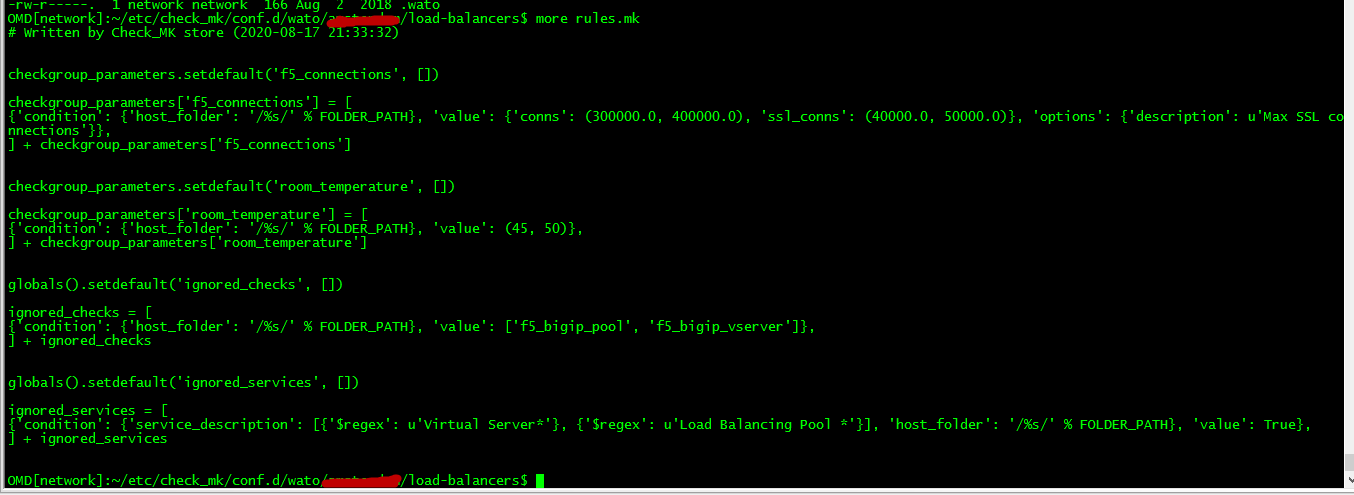
ok went to into into wato into a directory and picked a device I see a host and rules .mk I did a screenshot on rules.mk is this what I am looking for?
-rw-r-----. 1 network network 166 Aug 2 2018 .wato
OMD[network]:~/etc/check_mk/conf.d/wato/Second_site/load-balancers$ ls -la
total 12
drwxr-x—. 2 network network 51 Aug 18 21:04 ./
drwxr-x—. 12 network network 235 Aug 17 21:33 …/
-rw-rw----. 1 network network 1856 Aug 17 21:33 hosts.mk
-rw-rw----. 1 network network 1044 Aug 17 21:33 rules.mk
-rw-r-----. 1 network network 166 Aug 2 2018 .wato
OMD[network]:~/etc/check_mk/conf.d/wato/amsterdam/load-balancers$
If there is nowhere a file with “checks” in it, it can also be that in your old system are some extensions that are not compatible anymore.
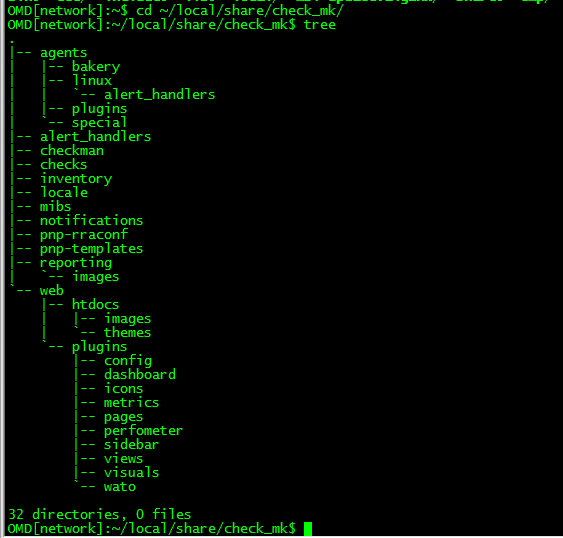
Take a look at your “~/local/share/check_mk/” folder if there is something inside. If you create a new clean site the whole structure is empty there.
ok I did snapshot restore and removed all deprecated rule sets and package extension and re-did the upgrade still show same error when I start omd also adding below a view of ~/local/share/check_mk/
I find a file with “check” it is a windows.mk file “/omd/sites/network/etc/check_mk/conf.d” trying to see if I can just delete file or make changes within gui
looks like windows.mk file “/omd/sites/network/etc/check_mk/conf.d” was it going revert back to orginal snapshot leave my extensions and remove windows.mk and see how it goes I will do this on Monday thx for you help guys