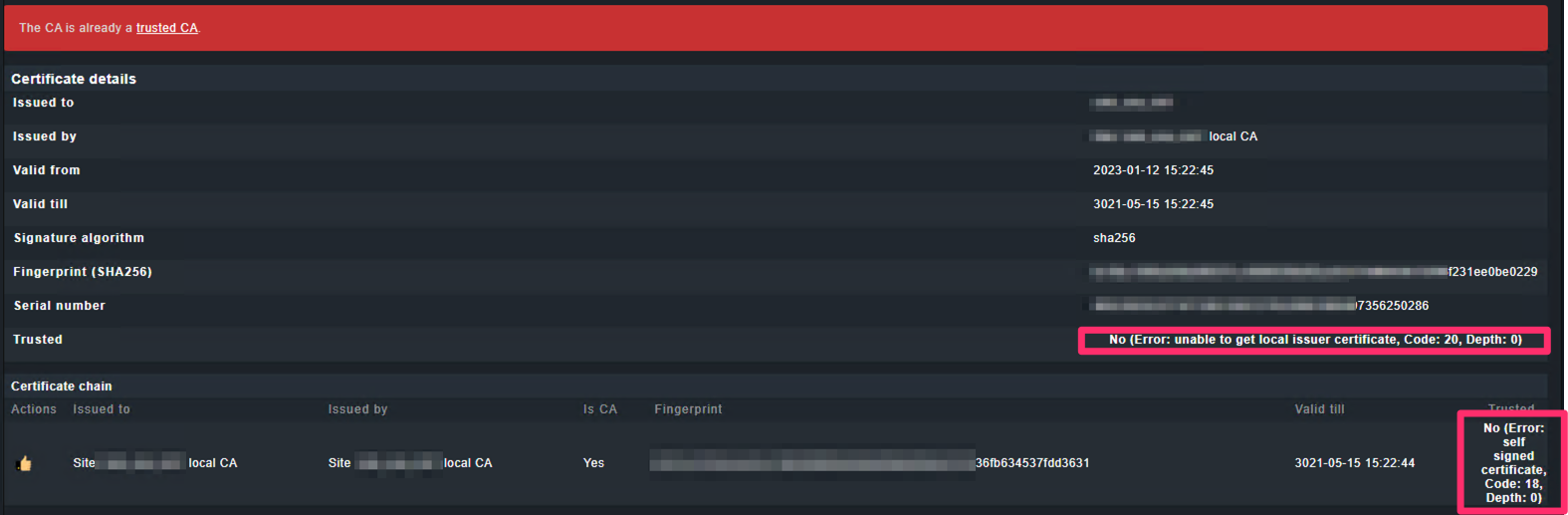
Error message:No (Error: unable to get local issuer certificate, Code: 20, Depth: 0)
Hello all,
Currently I have 11 CheckMK appliances. 1 Master and 10 Slaves.
2 of those Slaves are from external companies, which means different CAs, ADs, Subnets, etc…
What is the issue here? every time I try to issue a local certificate at first it gets added and it says “trusted” but as soon as I activate the changes I get the following error when checking the certificate again:
Already asked for the CA certificate of their companies and added on the master appliance under
If I turn off the option “Verify the Livestatus server certificate using the local site CA” the site gets online yes, but I get errors trying to register the hosts
“HTTPSConnectionPool(host=xx.name.xx.de’', port=443): Max retries exceeded with url: /site_slave/check_mk/register_agent.py (Caused by SSLError(SSLCertVerificationError(1, ‘[SSL: CERTIFICATE_VERIFY_FAILED] certificate verify failed: unable to get local issuer certificate (_ssl.c:1129)’)))”"
Ports 443 are open as I can access it through HTTPS.
So It seems I cannot ignore this problem.
Any help is appreciated.
All the messages looking like a problem with the local Apache SSL configuration.
You are sure that the used certificates and the corresponding CA certificates are referenced correctly from your Apache setup?
Thanks for the response.
You mean the certificate install on the webconf for web access?
I’m currently talking with my colleagues to see how they are generating the certificate.
I would say we need the whole chain correct?
I think you have two different problems as the first post problem has nothing to do with the problems from the other posts.
First post looks like a problem with the site internal certificates. All the other posts is a problem with the system Apache certificates.
I don’t know what you mean here with “every time I try to issue a local certificate”. Inside the CMK site you normally cannot issue any certificates manually.
Maybe I expressed my self incorrectly.
I meant the certificate that you normally have to click on the shield icon and add to the certificate trust authorities
But for what you’re saying is a different problem and probably not the main issue here as I have my own certificate.
Then, I should look to correct the apache SSL certificate, but a question I have and maybe a little stupid but to fix apache certificate you mean the certificate we normally import on the webconf settings or am I missing something? The others ones (generated by me) I just imported the certificate in webconf and was good to go, this one I need to confirm with my colleagues as it was generated by an external company
I’m using my own certificate don’t get it why it keeps picking the local certificate.
C:\Program Files (x86)\checkmk\service>check_mk_agent.exe updater register -H hostname -U cmkupdate -S password
C:\ProgramData\checkmk\agent\modules\python-3\.venv\lib\site-packages\OpenSSL\_util.py:6: UserWarning:
You are using cryptography on a 32-bit Python on a 64-bit Windows Operating System.
Cryptography will be significantly faster if you switch to using a 64-bit Python.
from cryptography.hazmat.bindings.openssl.binding import Binding
HTTPSConnectionPool(host='site.de', port=443): Max retries exceeded with url: /site/check_mk/register_agent.py
(Caused by SSLError(SSLCertVerificationError(1, '[SSL: CERTIFICATE_VERIFY_FAILED]
certificate verify failed: unable to get local issuer certificate (_ssl.c:1129)')))

C:\Program Files (x86)\checkmk\service>
Please pay attention you mix here two different certificates.
The screenshot with the CA error is from the livestatus TLS connection and the error from the last post is from the certificate of your system Apache.
These two are different certificates.
I understand what you saying, but shouldn’t the appliance use the same certificate I import for both Livestatus TLS connection and Apache system? @andreas-doehler
This topic was automatically closed 365 days after the last reply. New replies are no longer allowed. Contact an admin if you think this should be re-opened.