Veeam: Time since last Backup Rule doesn't work (no effect)

**CMK version: 2.3.0p13 **
OS version: 1.7.4

Error message: NO ERROR MESSAGE

I have the same exact problem as mentioned here, the rule is applied to the VBR mgmt server hosts but the discovered veeam jobs don’t change to WARN/CRIT according to setup thresholds under the rule " [Veeam: Time since last Backup]"

Please assist we have the Enterprise version we just recently upgraded to v2.3.0

Regards.

I have the same issue. Appreciate any help.
Kind regards

1 Like

Hi @SafiBeik,

welcome to the forum!

Sounds like a bug to me. Can you maybe share the agent output of a job? You can redact the job name, but it would be interesting if there was a change in the time format or something else.

Looking forward to your response!

Regards
Norm

2 Likes

Hi Norm,

Thank you

here is the agent output in relation to veeam plugin:

<<<check_mk>>>
Version: 2.3.0p13
BuildDate: Aug 19 2024
AgentOS: windows
Hostname: ********************
Architecture: 64bit
OSName: Microsoft Windows Server 2019 Standard
OSVersion: 10.0.17763
OSType: windows
Time: 2024-10-03T09:31:05+0200
WorkingDirectory: C:\Windows\system32
ConfigFile: C:\Program Files (x86)\checkmk\service\check_mk.yml
LocalConfigFile: C:\ProgramData\checkmk\agent\check_mk.user.yml
AgentDirectory: C:\Program Files (x86)\checkmk\service
PluginsDirectory: C:\ProgramData\checkmk\agent\plugins
StateDirectory: C:\ProgramData\checkmk\agent\state
ConfigDirectory: C:\ProgramData\checkmk\agent\config
TempDirectory: C:\ProgramData\checkmk\agent\tmp
LogDirectory: C:\ProgramData\checkmk\agent\log
SpoolDirectory: C:\ProgramData\checkmk\agent\spool
LocalDirectory: C:\ProgramData\checkmk\agent\local
OnlyFrom: ******************** ******************** ******************** ******************** ******************** ******************** ******************** 127.0.0.1

<<<cmk_agent_ctl_status:sep(0)>>>
{"version":"2.3.0p13","agent_socket_operational":true,"ip_allowlist":["********************","********************","********************","********************","********************","********************","********************","127.0.0.1"],"allow_legacy_pull":true,"connections":[]}

<<<logwatch>>>
[[[Veeam Backup]]]
W Oct 03 09:30:24 0.190 Veeam_MP Replication job '********************' finished with Warning.  Job details: Nothing to process: all machines were excluded from task list  
W Oct 03 09:30:24 0.0 Veeam_Backup Session ******************** has been completed.  

<<<checkmk_agent_plugins_win:sep(0)>>>
pluginsdir C:\ProgramData\checkmk\agent\plugins
localdir C:\ProgramData\checkmk\agent\local
C:\ProgramData\checkmk\agent\plugins\cmk_update_agent.checkmk.py:CMK_VERSION = "2.3.0p13"
C:\ProgramData\checkmk\agent\plugins\veeam_backup_status.ps1:CMK_VERSION = "2.3.0p13"
C:\ProgramData\checkmk\agent\local\status_check.ps1:CMK_VERSION = unversioned

<<<veeam_tapejobs:sep(124)>>>
JobName|JobID|LastResult|LastState

<<<veeam_jobs:sep(9)>>>
********************	Replica	Working	None	03.10.2024 09:30:07	01.01.1900 00:00:00
********************	Backup	Stopped	None		
********************	Backup	Stopped	Success	02.10.2024 19:30:05	03.10.2024 02:29:49
********************	Backup	Stopped	Success	02.10.2024 23:15:10	03.10.2024 05:44:54
********************	Replica	Stopped	Success	03.10.2024 00:00:05	03.10.2024 00:07:46
********************	Backup	Stopped	Success	03.10.2024 02:15:00	03.10.2024 05:45:58
********************	BackupSync	Idle	None	02.10.2024 00:00:36	02.10.2024 03:08:27
********************	Backup	Stopped	Success	02.10.2024 20:00:29	02.10.2024 21:44:30
********************	Backup	Stopped	Success	02.10.2024 20:00:30	03.10.2024 01:24:56
********************	Backup	Stopped	Success	02.10.2024 22:00:08	03.10.2024 01:25:07
********************	Replica	Stopped	Warning	03.10.2024 00:00:06	03.10.2024 00:00:19
********************	Backup	Stopped	Success	02.10.2024 22:30:21	03.10.2024 01:38:54
********************	Replica	Stopped	Warning	03.10.2024 08:00:15	03.10.2024 08:00:28
********************	Replica	Stopped	Warning	03.10.2024 09:30:07	03.10.2024 09:30:24
********************	Backup	Stopped	Success	02.10.2024 23:15:10	03.10.2024 05:42:34
********************	Backup	Stopped	None		
********************	Backup	Stopped	Success	02.10.2024 23:15:11	03.10.2024 04:53:25
********************	BackupSync	Working	None	27.09.2024 14:15:24	01.01.1900 00:00:00
********************	Replica	Stopped	Success	06.09.2024 09:53:01	06.09.2024 09:59:24
********************	Replica	Stopped	Success	03.10.2024 09:00:04	03.10.2024 09:04:45
********************	BackupSync	Idle	None	02.10.2024 00:00:36	02.10.2024 02:52:36
********************	Replica	Stopped	Success	03.10.2024 08:00:16	03.10.2024 08:06:38
********************	Backup	Stopped	Success	02.10.2024 23:00:10	03.10.2024 04:35:17
********************	Backup	Stopped	Success	02.10.2024 21:30:15	03.10.2024 01:24:40

<<<<Here long veeam client logs for each vm in veeam jobs>>>>

Regards

Hi @SafiBeik,

thanks for providing the data.

I just checked this with one of my Veeam servers and I don’t have blank lines or the 01.01.1900 year in my output. It could be the reason why this is not working properly.

I’m not a software dev, so I would check the source code for parsing the agent output:

Or in case you have a support contract with Checkmk you should open a support ticket.

Best Regards
Norm

1 Like

Hi @Norm

So, I deleted the jobs that are showing blank and now agent output looks normal, but still the rule about the “time since last veeam backup” doesn’t appear to have any effect on the veeam jobs service states.

<<<check_mk>>>
Version: 2.3.0p13
BuildDate: Aug 19 2024
AgentOS: windows
Hostname: ********************
Architecture: 64bit
OSName: Microsoft Windows Server 2019 Standard
OSVersion: 10.0.17763
OSType: windows
Time: 2024-10-03T09:31:05+0200
WorkingDirectory: C:\Windows\system32
ConfigFile: C:\Program Files (x86)\checkmk\service\check_mk.yml
LocalConfigFile: C:\ProgramData\checkmk\agent\check_mk.user.yml
AgentDirectory: C:\Program Files (x86)\checkmk\service
PluginsDirectory: C:\ProgramData\checkmk\agent\plugins
StateDirectory: C:\ProgramData\checkmk\agent\state
ConfigDirectory: C:\ProgramData\checkmk\agent\config
TempDirectory: C:\ProgramData\checkmk\agent\tmp
LogDirectory: C:\ProgramData\checkmk\agent\log
SpoolDirectory: C:\ProgramData\checkmk\agent\spool
LocalDirectory: C:\ProgramData\checkmk\agent\local
OnlyFrom: ******************** ******************** ******************** ******************** ******************** ******************** ******************** 127.0.0.1

<<<cmk_agent_ctl_status:sep(0)>>>
{"version":"2.3.0p13","agent_socket_operational":true,"ip_allowlist":["********************","********************","********************","********************","********************","********************","********************","127.0.0.1"],"allow_legacy_pull":true,"connections":[]}

<<<logwatch>>>
[[[Veeam Backup]]]
W Oct 03 09:30:24 0.190 Veeam_MP Replication job '********************' finished with Warning.  Job details: Nothing to process: all machines were excluded from task list  
W Oct 03 09:30:24 0.0 Veeam_Backup Session ******************** has been completed.  

<<<checkmk_agent_plugins_win:sep(0)>>>
pluginsdir C:\ProgramData\checkmk\agent\plugins
localdir C:\ProgramData\checkmk\agent\local
C:\ProgramData\checkmk\agent\plugins\cmk_update_agent.checkmk.py:CMK_VERSION = "2.3.0p13"
C:\ProgramData\checkmk\agent\plugins\veeam_backup_status.ps1:CMK_VERSION = "2.3.0p13"
C:\ProgramData\checkmk\agent\local\status_check.ps1:CMK_VERSION = unversioned

<<<veeam_tapejobs:sep(124)>>>
JobName|JobID|LastResult|LastState

<<<veeam_jobs:sep(9)>>>
********************	Replica	Stopped	Success	07.10.2024 13:00:08	07.10.2024 13:03:58
********************	Backup	Stopped	Success	06.10.2024 19:30:19	07.10.2024 03:58:45
********************	Backup	Stopped	Success	06.10.2024 23:15:04	07.10.2024 09:02:31
********************	Replica	Stopped	Success	07.10.2024 00:00:12	07.10.2024 00:07:51
********************	Backup	Stopped	Success	07.10.2024 02:15:13	07.10.2024 09:04:04
********************	BackupSync	Idle	None	02.10.2024 00:00:36	02.10.2024 03:08:27
********************	Backup	Stopped	Success	06.10.2024 20:00:03	07.10.2024 03:57:02
********************	Backup	Stopped	Success	06.10.2024 20:00:04	07.10.2024 05:21:13
********************	Backup	Stopped	Success	06.10.2024 22:00:18	07.10.2024 04:00:07
********************	Replica	Stopped	Warning	07.10.2024 12:00:11	07.10.2024 12:00:24
********************	Backup	Stopped	Success	06.10.2024 22:30:02	07.10.2024 04:57:28
********************	Replica	Stopped	Warning	07.10.2024 08:00:10	07.10.2024 08:00:47
********************	Replica	Stopped	Warning	07.10.2024 13:00:08	07.10.2024 13:00:25
********************	Backup	Stopped	Success	06.10.2024 23:15:06	07.10.2024 08:54:57
********************	Backup	Stopped	Success	06.10.2024 23:15:09	07.10.2024 09:00:06
********************	BackupSync	Idle	None	03.10.2024 14:27:28	05.10.2024 05:07:00
********************	Replica	Stopped	Success	06.09.2024 09:53:01	06.09.2024 09:59:24
********************	Replica	Stopped	Success	07.10.2024 13:00:09	07.10.2024 13:04:53
********************	BackupSync	Idle	None	02.10.2024 00:00:36	02.10.2024 02:52:36
********************	Replica	Stopped	Success	07.10.2024 12:00:11	07.10.2024 12:06:32
********************	Backup	Stopped	Success	07.10.2024 06:31:38	07.10.2024 08:07:35
********************	Backup	Stopped	Success	06.10.2024 21:30:20	07.10.2024 03:58:09

<<<<Here long veeam client logs for each vm in veeam jobs>>>>


I think it could be a bug

The problem still exists in 2.4.0p6. Has anyone found a solution or at least a workaround?

Same problem here.
No solution???
That’s really bad if you don’t see that status.

We have the same problem. This still doesn’t seem to be fixed.
Looking at the code in the github repo it seems like the veeam_jobs.py does not take any parameters in the check function (no “params” argument in the function signature) and therefore does definitely not use the ones set in “Veeam: Time since last Backup”.

Unfortunately, i don’t know how to extend existing plugins delivered by Checkmk themselves. When i copy just that file into an own plugin and change it, it just tells me “plug-in ‘veeam_jobs’ already defined at cmk plugins.collection.agent_based.veeam_jobs:agent_section_veeam_jobs”. I also tried playing around with the AgentSection and CheckPlugin to see if i can get it to recognize a changed version, but i still had no success.
So i guess the only option right now is copying all the files into a completely new plugin with another name and adding the parameter logic there. But i think that would also need another name for the section produced by the agent which means changing all deployed agent scripts for the plugin.
Also another thing i noticed is that the “Veeam: Time since last Backup” ruleset wasn’t migrated to the new Ruleset API (yet?) and also uses the internal name “veeam_backup” instead of “veeam_jobs”: checkmk/cmk/gui/plugins/wato/check_parameters/veeam_backup.py at master · Checkmk/checkmk · GitHub
So you would also need to change that. Also then the old ruleset would still show in wato next to your new version.
Overall not a very nice solution, so hopefully there is a real fix coming at some point.

We have a ticket for this. I will keep you informed on the updates.

1 Like

Hello!

We analysed the situation — there is no bug here.

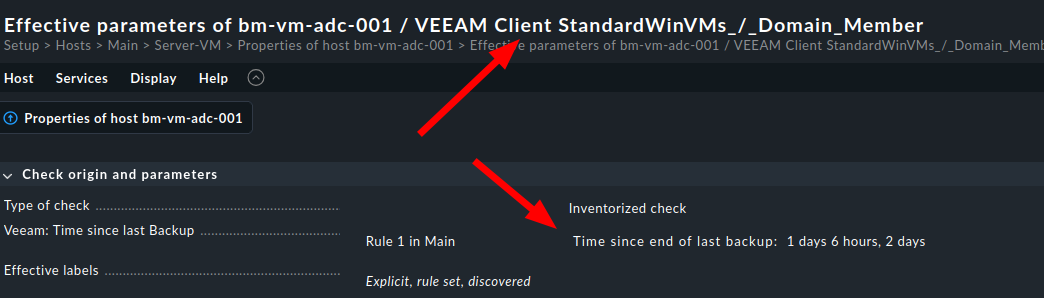
The confusion happened due to the fact that the rule “Veeam: Time since last Backup” is only applied by design to the Veeam Client (the rule’s name is imprecise). It can be applied to the Veeam Client and works correctly:

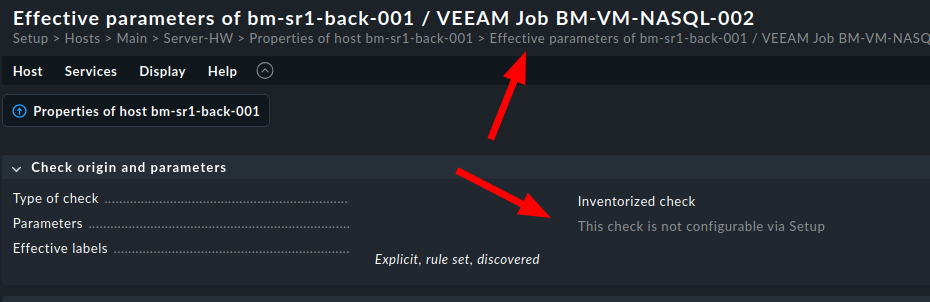
The Veeam Job cannot be configured with this rule, as you can see in the parameter of the service:

So, the rule works as designed, although the name could benefit from an additional mention of the Client.

On the other hand, adding a rule for the Job would be a request for extending the feature. Please consider adding the idea to our Ideas Portal so it can reach our product team.

2 Likes

Thank you for the update and clarification!

I did not know about the Veeam Client Check since it wasn’t automatically detected for pretty much all of our hosts, since i didn’t do a piggyback name translation for most of them. But after doing it, i was able to confirm that the rule also works correctly for me.

A clarification in the description/help text of the rule would definitely be appreciated, though.

But i still think giving users the flexibility to only monitor the jobs on the backup server and setting the thresholds there would be pretty nice as well, since that needs less configuration (at least if you don’t already use piggyback for those hosts). Also, it would provide a better centralized overview over all jobs, which some might prefer/find more intuitive.