Hi, the service column has randomly just become stretched across the screen. I cannot find any particular option to manually bring this back and I don’t know why it just started happening.
Can anyone assist?
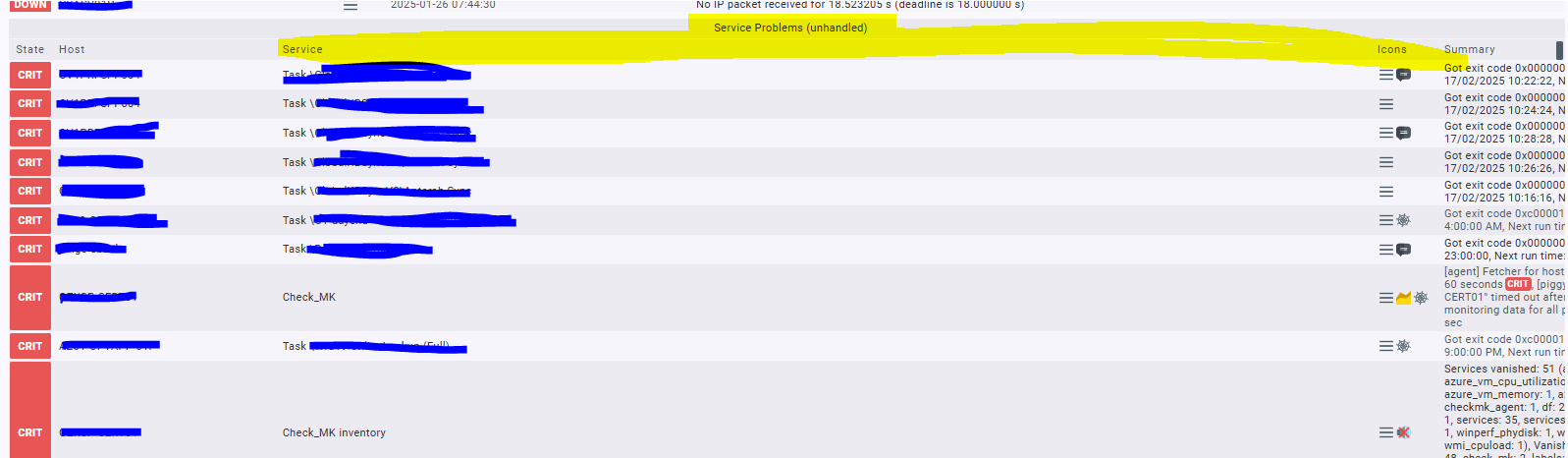
The td of service column has CSS class nobr, (style is white-space: nowrap; text-wrap-mode: nowrap; white-space-collapse: collapse;) which causes that the full service name is in 1 line.
To make it all stretched like yours, I would suspect a very long service name, or one that is padded with lots (non-breaking) spaces.
Maybe you can inspect the HTML source of the page to see which service is responsible for this.
Hi.
Look at the the “Basic layout”. I think in your case you use “Table”. This will stretch the colums. Please try “Balanced boxes” and the culumns will not stretched.
RG, Christian
This is interesting, as yesterday there was a number of very long service names which I noticed was in warning state. I’ve resolved these and it’s gone back now to what it was before.
Is there a way to ‘text wrap’ this if it happens in future again like you do with excel, in other words have it run into a second line?
Best to find out which service goes beserk in name length, so you don’t have to use workarounds.
I can think of 2 workarounds to tackle it:
- If you are the only person monitoring, you can fix it on the client side with a browser add-on like Stylus. Available for at least Firefox & Chrome and which lets you enforce CSS in your browser only. Then make a style that changes the
nobrstyle into a text wrap version. Since that style would be on your browser only, no need to worry about Checkmk version updates. Also you can easily turn that style on & off when needed.
Example of my Firefox browser that has 2 styles configured for my Checkmk server:
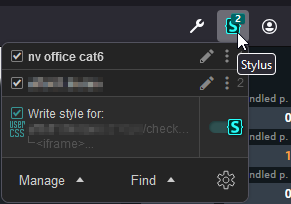
Just (un)check to (de)activate a style. - If you got a whole team and use various devices for monitoring, probably better to make an alternative theme for your server(s). See following threads for notes how to create a theme.
Customize/change HTML of dashboards - #3 by Yggy
Manager asked for a bit more color
To tweak, just to see if a style works, it might be faster and easier to do so in Stylus first.
Probably you need something like following as style to counterreact the original style:
table.data td.nobr{
   white-space: normal;
}
EDIT:
Another alternative is what @ChristianM suggests.
In view, go to Display > Customize view and change Basic Layout from Table to Balanced boxes.
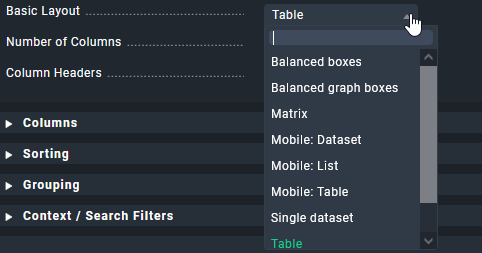
But I have not used this before, so not sure what the outcome will be.
This topic was automatically closed 365 days after the last reply. New replies are no longer allowed. Contact an admin if you think this should be re-opened.