Hi everyone
the werk 10534 does not work correct in 1.6p11CEE
We have a bunch of Palo Alto Firewalls (>500) which are replaced by newer models where we exactly face this problem:
SNMP Discovery would not discover >>all<< new/vanished services (in our case new interfaces are not added but a new temperature sensor is) and until we trigger the SNMP query (i.e. “Check_MK”) and the discovery (i.e. “Check_MK Discovery”) once one after another by hand in the webinterface.
Discovery with similar rules with with TCP based agents works as expected.
Workarounds:
-Create a copy of the host, then it is added with all services it should have
-Do a cmk -IIv as siteuser.
What we also tried is: set " Perform full SNMP scan always, detect new check types" in the discovery rule and global settings, but no luck
It seems some “caching” is disturbing here
Your problem looks different then the problem addressed by the werk.
If you say it don’t find new interfaces then it is something else as all interfaces are pulled with one snmpwalk and then cached. The cached data was used correctly. What was not found, was a complete new check for something else.
Without further troubleshooting and outputs from the command line i think this is not the same problem.
Hi Andreas
thanks for the fast reply. The weird thing is:
When i just edit the host in WATO and go to Services, all interfaces that have existed on the predecessor (and still exist on the new one) which are deactivated via rule (Interface mgmt, loopback etcetc, these are a bunch) are found correctly and listed as disabled services. But the new ones won’t be found
Sorry i did not mention this detail first
Exactly this is what I mean, this must be another problem and is not touched by the mentioned werk.
If you have such a device available for test. That is not manually forced to make a discovery.
Then a test on command line with cached data would be good.
Hi Andreas
as mentioned: if i do a cmk -IIv via CLI as siteuser on existing hosts then all is good.
Is there a possibility tu flsuh all cached data just to be sure?
Hi Andreas
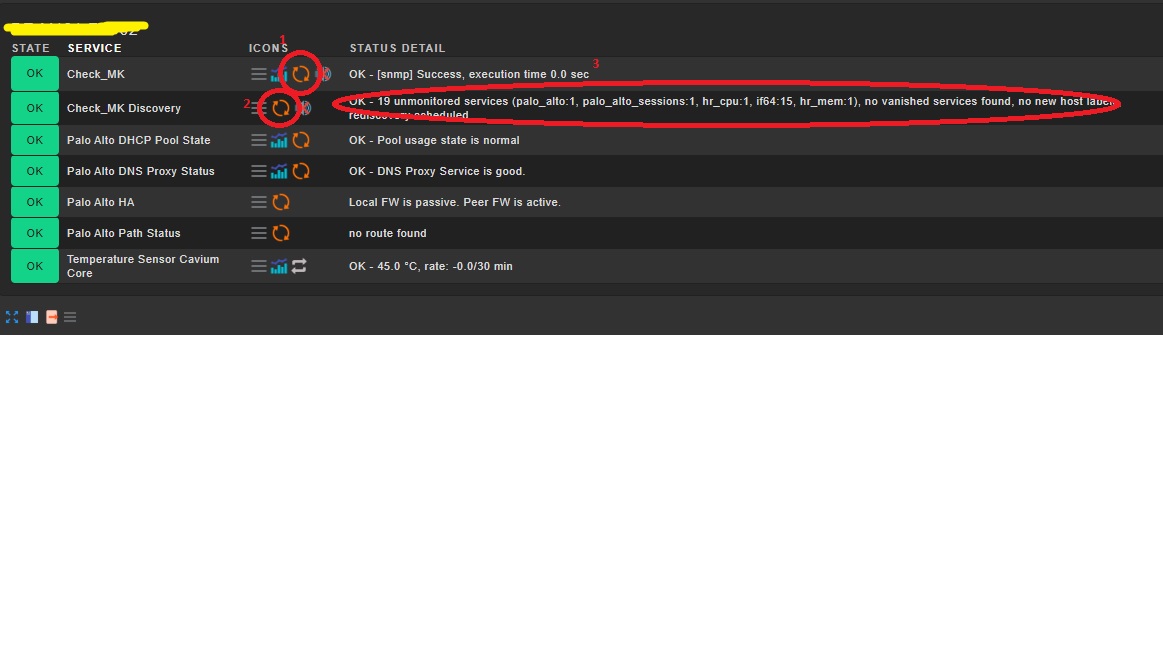
i just tried it one more: Check_MK and Check_MK Discovery running as scheduled, both green but no services discovered. Triggered Check_MK (1) and then Discovery right afterwards (2) t and voila: Service Discovery recognizes new interfaces’n’stuff. (3)
I see that it might not be related to Werk 10534 So why would it not work by itself?
Hi Andreas
the defaut rule is 5mins for the regular check (agent-independent) and 30min to 1h for the discovery (depending on the device).
We have several rules configured, that apply to different devices and should add/remove services dynamically. Today turned out that is npot the case with our Palo Alto devices.
For Windows servers it works, unfortunately i do not have any other SNMP devices to replay this at the moment.
I edited my last post with a screenshot to show the steps i take
Can you test for some devices if you modify the check interval to the normal 1 minute if it works then?
I think it has something to do with cached data and your setting of your discovery rule.
Hi Adreas
we already did this, also Discovery to 5mins, no luck.
The 5min check interval is standard troughout our setup which is located in Frankfurt and reaches to Portugal in the West, Sweden up North, Italy southbound and Turkey in the East and is mostly SNMP. 5mins is a good balance between load, false alerts due to WAN issues and Freshness" of the data/metrics.
Only a few core devices in our data centers and campus are queried every minute.
You are sure that your discovery rule has not selected the “Just rely on existing check files…” option?
Please do on your command line a cmk --debug -vv --check-discovery hostname
And try to do it in a setting where you get no new or changed services on your other devices.
Important are the first few lines.
There should be that no cache is used and you should see the command pull fresh data from the device.
Hi Andreas
we have set this:
Service discovery check for SNMP devices:
Perform full SNMP scan always, detect new check types
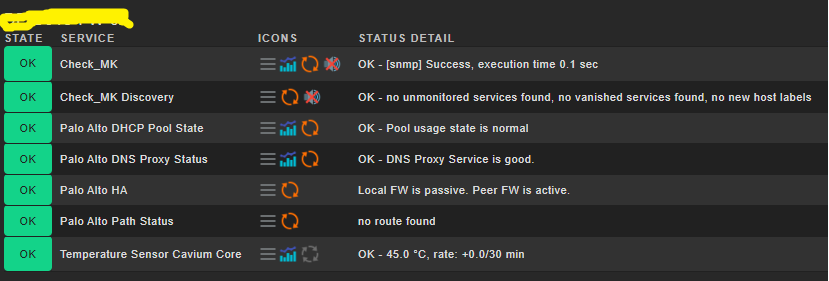
And still: the firewalls showed up as attached screenshot, until the discovery was triggered either via CLI or when trigering the agent and then discovery afterwards (see screenshot above)
BR
Unfortunately for further troubleshooting we nox fixed all by hand, bercause yeah this is operations and we need it So i do not have any more device to test atm.