For self-made special agents which query some REST APIs, I’m trying to do it the new way of using the CMK 2.3 Plugin API. But I don’t even get where to place them - as I cannot find it in any documentation.
Let’s start with the example in CMK UI > Help > Plug-in API references > Server-side calls:
Is this example still correct and should it work? For instance, there is no shebang line.
Do I have to place those two files in some “addons” folder as discribed in some forums?
Are some file permissions to be set?
How to activate the example special agent and where does it appear in the UI?
What does the example do? Does it query some REST APIs at it is a server-side plugin?
Please don’t refer to any Git repos as they don’t explain where the self-made special agents have to be placed.
Why not - i use one of my simple special agent checks if i write something new.
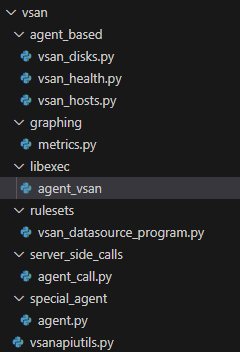
This here is an example of a very simple special agent based check in the new folder structure.
Here you separate your files accordingly :
…/<plugin_name>/agent_based/
…/<plugin_name>/checkman/
…/<plugin_name>/rulesets/
…/<plugin_name>/server_side_calls/
…/<plugin_name>/special_agents/
…/<plugin_name>/libexec/
…/<plugin_name>/(…)
You have a good plugin to check as template on exchange - maybe it helps you going further on developing :
this folder path is also used for a self-written special agent
the python module fetching the REST data must be stored in lib/ and be called “agent.py” (EDIT: it depends what is defined in libexec/agent_-name- but this naming makes sense)
the API doc is therefore useless or even outdated
Thanks for any advice and in my opinion a bit much magic without docs…
This has nothing to do if it is a special agent or not. Every own extension to CheckMK should be under this path.
No
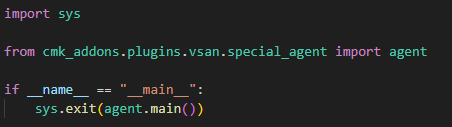
libexec path → stub file with name defined inside “server_side_call”, executing the Python main function from the real special agent inside “special_agents” folder
No
The API doc only describes what you need to do inside the “server_side_call” file. Nothing else.
Why do you seperate the special agent from the libexec wrapper? what is the purpose of this? I’ve coded the agent directly into the executable in the libexec folder and it works fine. I might be missing something though…
I’m just a deep dive customer. I just tried to understand this concept from examples and currently streamline all extensions to this structure. When something is dropped or enforced in the next version there is less hassle to update it.
And: When I move my “special_agent/agent.py” to “libexec/agent_vsan” I have no syntax highlighting in vi (when highlighting is based on file extension) and makes changes more difficult.
This topic was automatically closed 365 days after the last reply. New replies are no longer allowed. Contact an admin if you think this should be re-opened.