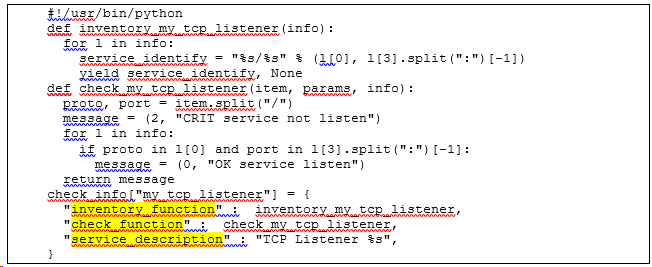
This is using the agent plugins method to check for the TCP port listening, for example, to check for all Oracle listening tcp/ip ports.
This is follows the the following URL,
(https://lanbugs.de/howtos/monitoring-check_mk/check_mk-eigener-agent-check/)
On monitoring server, I create the following python script, name it - my_tcp_listener:
#!/usr/bin/env python
def inventory_my_tcp_listener(info):
   for l in info:
      service_identify = “%s/%s” % (l[0], l[3].split(":")[-1])
      yield service_identify, None
def check_my_tcp_listener(item, params, info):
   proto, port = item.split("/")
   message = (2, “CRIT service not listen”)
   for l in info:
      if proto in l[0] and port in l[3].split(":")[-1]:
          message = (0, “OK service listen”)
      return message
check_info[“my_tcp_listener”] = {
    “inventory_function” : inventory_my_tcp_listener,
    “check_function” : check_my_tcp_listener,
    “service_description” : “ORACLE Listener %s”,
}
Put this script in /omd/sites/SIN/local/share/check_mk/checks folder
On normal Monitored Test servers, create the following bash script, name it my_tcp_listener.sh,
#!/bin/bash

echo “<<<my_tcp_listener>>>”

netstat -tlpen sed 1,2d grep –w “1522\ 1523\ 1524\ 1526\ 1528\ 1529\ 1530\ 1531\ 1534”
Put this script in /usr/lib/check_mk_agent/plugins/ folder
I can see the required Services show on the checkmk portal.
However, our oracle db servers are running check_MK agent in the context of “nagios” account.
The difference is, instead of default “/usr/lib/check_mk_agent/plugins/” folder, it use “/home/nagios/plugins” folder.
The check_mk_agent is installed in /home/nagios/bin/ folder. I typed “./check_mk_agent | grep Directory”, and found that the plugins directory is located at “/home/nagios/plugins”
I copied the my_tcp_listener.sh to the given directory, chown nagios:nagios, and then chmod 755 this script. However, this doesn’t work.
I even edit my_tcp_listener.sh to,
#!/bin/bash
echo “<<<my_tcp_listener>>>”
sudo netstat -tlpen sed 1,2d grep –w “1522\ 1523\ 1524\ 1526\ 1528\ 1529\ 1530\ 1531\ 1534”
But, still the tcp ports not displayed in check_MK portal.