Hello, I am very new to CheckMK (like 1 day new) so I’m learning. I have been tasked to deploy the CheckMK agent to all of my Windows 2019 servers. I have baked and signed agents and am able to install them without issue, but when they check in they are only listed by host name. Is there any way I can update the config and have them check in by FQDN? This is an issue as we have multiple domains with some servers having the same host name. FQDN would be the optimal way to identify which is which.
I’m not sure if we are talking about the same thing, but yes we are using the console to bake in the registration information. I just need to install the .msi and it auto connects to the console. This results in for example (machine name) DC1 instead of DC1.domain.com. We would like the latter.
The problem here is the “cmk-agent-ctl register-new” command. This command knows no option to define a hostname. It is issued if a pre-configured agent is deployed.
I would say this is a bug in the automatic agent registration.
There are two possible options that could solve the problem.
if option is set for FQDN the agent controller uses the FQDN for registration
or
there is an option to explizit define the hostname that should be used for registration
or
Ok, will this be registered as a bug officially that I can track? Also any idea on turn around time for a fix? If I need to deploy my agents in the mean time what if any alternate options do I have?
For the first deployment i use most times a type of script (bash/powershell) to create the host if not existing and here i have the possibility to specify if i want a short name or FQDN.
I have used the RAW and Enterprise Edition for a few years each.
Since last week im now working with the Cloud Edition and came on the same Problem as OP.
Is this now a bug for checkmk trying to fix? If yes, any ticket that i can follow and keep track of?
I tried doing it your way @andreas-doehler but for some reason the push agent created a new host for alle the already registered hosts wiht just the hostname, even with the FQDN in the cmk-agent-ctl command.
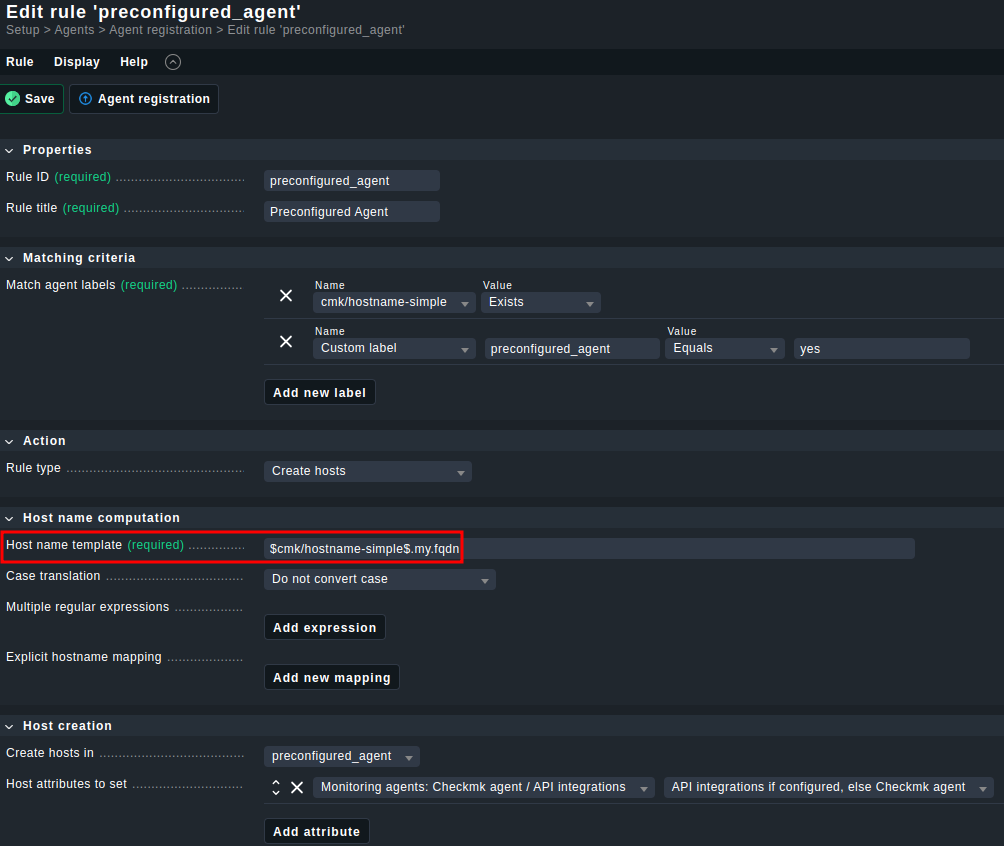
Mind you, a FQDN is often just something the outside world knows and not the host itself. Hence, I think the above makes enough sense to cater to the use case. For different domains, one could use different labels and rules.
This topic was automatically closed 365 days after the last reply. New replies are no longer allowed. Contact an admin if you think this should be re-opened.