CMK version:2.2.0p41
OS agent version: Microsoft Windows Server 2019
Error message:
2025-06-06 07:34:07.702 [ctl:4424] [cmk_agent_ctl::modes::pull][DEBUG] processed task!

2025-06-06 07:35:07.275 [ctl:4424] [cmk_agent_ctl::modes::pull][INFO] [::ffff:10.0.xx.xx]:48578: Handling pull request.

2025-06-06 07:35:07.306 [ctl:4424] [cmk_agent_ctl::modes::pull][DEBUG] [::ffff:10.0.xx.xx]:48578: Handling pull request DONE (Task detached).

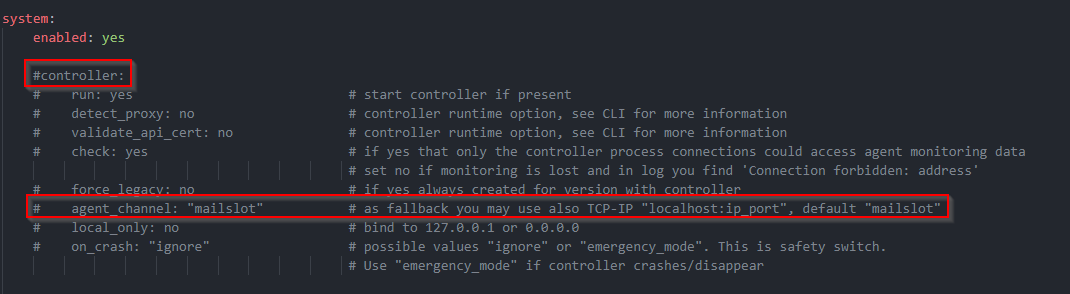
2025-06-06 07:35:07.337 [ctl:4424] [cmk_agent_ctl::mailslot_transport][WARN] Error server mailslot name Global\WinAgentCtl_4424_7656_0 is in use, retry...

2025-06-06 07:35:07.369 [ctl:4424] [cmk_agent_ctl::mailslot_transport][WARN] Error server mailslot name Global\WinAgentCtl_4424_7656_1 is in use, retry...

2025-06-06 07:35:07.400 [ctl:4424] [cmk_agent_ctl::mailslot_transport][WARN] Error server mailslot name Global\WinAgentCtl_4424_7656_2 is in use, retry...

2025-06-06 07:35:07.421 [ctl:4424] [cmk_agent_ctl::mailslot_transport][WARN] Error server mailslot name Global\WinAgentCtl_4424_7656_3 is in use, retry...

2025-06-06 07:35:07.453 [ctl:4424] [cmk_agent_ctl::mailslot_transport][WARN] Error server mailslot name Global\WinAgentCtl_4424_7656_4 is in use, retry...

2025-06-06 07:35:07.485 [ctl:4424] [cmk_agent_ctl::mailslot_transport][WARN] Error server mailslot name Global\WinAgentCtl_4424_7656_5 is in use, retry...

2025-06-06 07:35:07.516 [ctl:4424] [cmk_agent_ctl::mailslot_transport][WARN] Error server mailslot name Global\WinAgentCtl_4424_7656_6 is in use, retry...

2025-06-06 07:35:07.547 [ctl:4424] [cmk_agent_ctl::mailslot_transport][WARN] Error server mailslot name Global\WinAgentCtl_4424_7656_7 is in use, retry...

2025-06-06 07:35:07.578 [ctl:4424] [cmk_agent_ctl::mailslot_transport][WARN] Error server mailslot name Global\WinAgentCtl_4424_7656_8 is in use, retry...

2025-06-06 07:35:07.609 [ctl:4424] [cmk_agent_ctl::mailslot_transport][WARN] Error server mailslot name Global\WinAgentCtl_4424_7656_9 is in use, retry...

2025-06-06 07:35:07.641 [ctl:4424] [cmk_agent_ctl::mailslot_transport][WARN] Error server mailslot name Global\WinAgentCtl_4424_7656_10 is in use, retry...

2025-06-06 07:35:07.672 [ctl:4424] [cmk_agent_ctl::mailslot_transport][WARN] Error server mailslot name Global\WinAgentCtl_4424_7656_11 is in use, retry...

2025-06-06 07:35:07.703 [srv 276] Request is '::ffff:10.0.xx.xx'

2025-06-06 07:35:07.704 [srv 276] [Err ] Invalid request '::ffff:10.0.xx.xx'

2025-06-06 07:35:07.704 [srv 276] [Err ] Invalid request '::ffff:10.0.xx.xx'

2025-06-06 07:35:07.735 [ctl:4424] [cmk_agent_ctl::modes::pull][DEBUG] processed task!
Hi,
we have some windows hosts where agent connection gets lost repeatedly.
restarting the checkmk service is solving the issue for a day or two, then the issue happens again. The error above is form checkmk log at this time when connection is lost. any idea what happens here?
Thanks