Windows Service / Discovery Rules

Dear Community,

i want to monitor some windows services and found two different rules.

The “Windows Services” rule and the “Windows Service Discovery” rule.

The first one let me set the state of my preferred service, like “the service is in OK state, if he isn’t running”

The second rule let me define: “Create check if service is in state running (/or stopped)”

I only get the second one running, the first one doesn’t add a service.

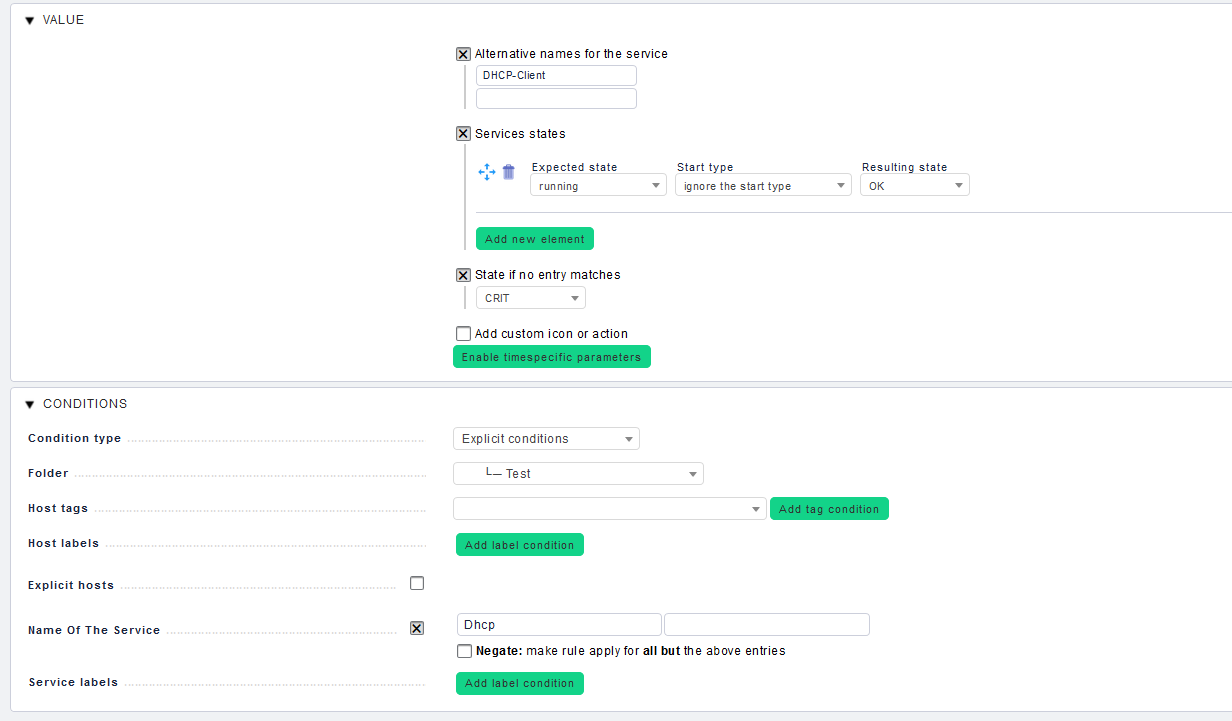
Let’s say, my rule should give me information about the “DHCP-Client” Service, which runs under the name “Dhcp”.

I’ll configured the “Windows Services” rule like shown in the picture.

what am i doing wrong?

Hi AlexanderS,

the rule “Windows Services” is for your thresholds, that means for already existing Services.
It’s pretty easy to say if it’s a “threshold”-rule by looking at the bottom of the page while creating/editing a rule.

If there is a “Name Of The Service”-Section, it’s focused on already existing services. :wink:
image

So, with “Windows Service Discovery” you can let Check_MK create Services based on the information from the Check_mk Agent. If your “service” there is missing, it won’t find anything to create.
For this point, it’s important that your allowing the section “Installed, stopped and running services” for your agents:
image

“Windows Services” ← Threshold rule, based on existing services (like saying, it’s OK if it is stopped)
“Windows Service Discovery” ← Creating services based on a regex and the agent output
I hope, i could help out.
Kruzgoth

So, i can finetune the “Windows Service Discovery” with “Windows Services”?

As far as i could get behind that, yes.

This topic was automatically closed 30 days after the last reply. New replies are no longer allowed.