After Update to Checkmk 2.3.0p42: The site is currently locked by another activation process

CMK version: Checkmk 2.2.0p47
OS version: Ubunutu 24

Error message: The site is currently locked by another activation process

I recently performed an update from Checkmk 2.2.0p47 to 2.3.0p42. This is a multisite setup with 3 slaves. During a previous test run, I found that a few plugins/packages were causing issues. The following are installed:

  • KPC-Windows-Updates 1.0.2
  • xyz-1 2.0.0
  • xyz-2 1.1.0
  • crl_url 1.1.1
  • hwg_wld 1.0
  • sslcertificates 8.5

I then disabled the following two packages before the update:

  • hwg_wld 1.0
  • KPC-Windows-Updates 1.0.2

The two xyz-* packages are custom developments.

After updating, everything looked good in the shell. I re-enabled the packages that I had disabled for the update. Additionally, after the update, a deployment must be performed in the Web GUI, and that is where the problem arises. After the deployment, I receive the messages “The site is currently locked by another activation process”

Unfortunately, the troubleshooting resources I found, including:

did not help. The error persisted despite repeatedly stopping and deleting older activations. At one point, I had the status where 2 sites were current and 2 (slaves) were in an error state.

Since we wanted to avoid a prolonged outage of the monitoring system, we reverted to the old version. As some plugins needed to be updated and required a deployment, we ended up going in circles.

I saved a few logs, but I didn’t find anything helpful in them.

Unfortunately, I saw the suggestion for the option ‘cmk --debug --vvR’ too late and could not execute it accordingly.

Do you have any ideas on what might be causing this error? A few days prior, I performed the same update on another Checkmk system without any issues.

I unfortunately don’t have much information, but perhaps someone can still help?

Thank you very much and best regards.
Annett

Why? If they are incompatible then you should not active the packages without newer updated versions installed.

You can update all plugins before you upgrade the CMK version. If the plugin requires CMK version 2.3.0b1 and onwards it will stay inactive until you update the CMK version. The old MKP should have a until version number that they will automatically be disabled at upgrade of the CMK version. As i don’t see if it is a RAW or enterprise environment in your case it is not so easy to say what you can do. In enterprise setups i would edit the old MKP that it have a until version present.

The update process for the MKP packages can be simulated inside a test site.

Hello Andreas,

thx for your quick answer.
I had selected it in the tags that it is a RAW version. :wink:

I am aware that I can install the newer packages beforehand. I handled it that way with the MS Teams packages during the last updates as well. However, I can’t tell you why I didn’t stick to that this time. For the hwg_wld package, I also installed a newer version, but it didn’t change anything.

Best regards/viele Grüße,
Annett

1 Like

With raw it is not so easy (nearly impossible) to reconfigure mkp’s to get until versions if not already existing in the package.

The make mkp compatible before the update is the only advice i can give here.

What you should test after you updated one of the worker sites is a “cmk –debug -vvU” if a config can be generated without any error message. This must work, if not the shown error needs to be fixed before all the other sites are updated.

Thank you. I will check this promptly. If I have more information, I will get back to you. However, today and probably tomorrow, I won’t be able to provide any further information.

But I do have one more question. If I create a test instance with the packages, would that be sufficient? Or is it absolutely necessary for a package to be actively used by a server?

For the update i is good if you have the mkp active inside the test site. You do normally don’t need any active checks there if you test the upgrade. Sometimes it is good to also have the config available if some parameters are broken.

For upgrade testing i would clone the central site without historic data, then you only have the config and current mkps in this site. But cloning a site sometimes also has it’s own problems :wink:

Hello Andreas,

I have now run various scenarios with the packages on the copied sites (I just did this with all of them). I noticed two packages that are causing issues:

  • hwg_wld version 1.0
  • KPC-Windows-Updates version 1.0.2

The hwg_wld package seems to still be using the old API, so I removed it before the update and installed a new version that can only be used with 2.3. I also completely removed the KPC-Windows-Updates package before the update. Unfortunately, the pre-installation of the new version 1.0.6 also led to an error, so I left that out for now.

I was able to perform the update on all sites without errors. Even “cmk --debug -vvU” showed no errors and returned OK. I then installed and enabled the KPC-Windows-Updates package again, which did not lead to any errors. Running “cmk --debug -vvU” again also showed no errors.

My next step is to carry this out on the production system. Since this requires a longer announcement on our end, I will reach out once I’m done. But so far, everything looks good.

Thank you very much for pointing me in the right direction!

Addendum: I haven’t looked into the frontend for any of them. :face_with_peeking_eye:

We applied the update yesterday. However, the problem persists. I executed the command “cmk --debug -vvU” in the shell each time and did not receive any errors.

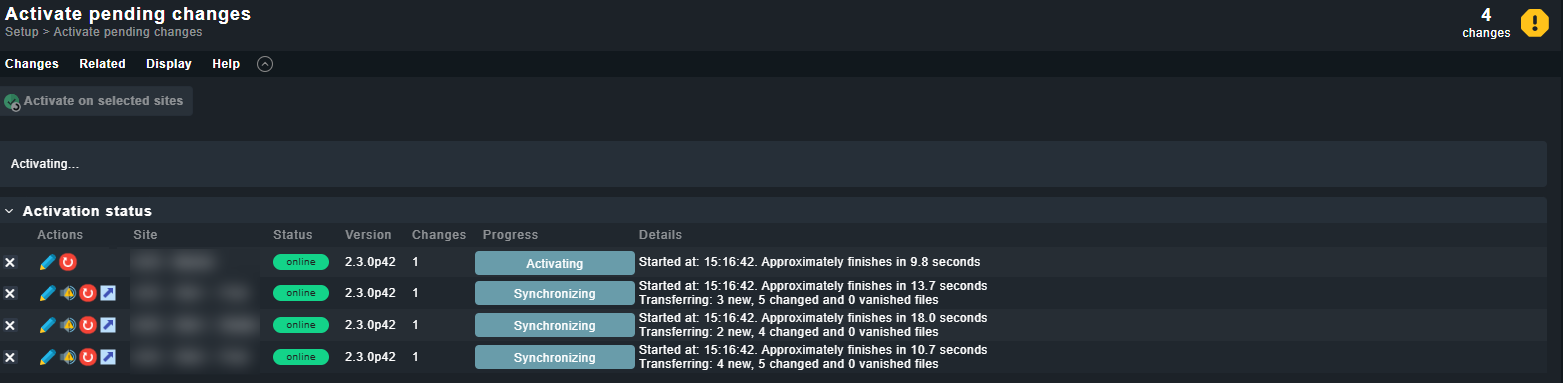
After adding the KPC package and running “cmk --debug -vvU,” I received no errors. I then started the site to access the UI. There was a change in the log that still needed to be activated, which I did. However, I waited 10 minutes and got stuck on this view:

I deleted all existing activations there. After that, I activated each site individually, and it worked. Therefore, I genuinely do not understand this behavior. For my colleagues, this is a no-go, and they want to roll back because the current workaround of activating all sites individually is not an option for them.

What could be causing this behavior? The sites remain in the “Synchronizing” status, thus blocking further possible activations.

The strange thing is that it stays at “Synchronizing”. If you the “Red” symbol in front of each site is used then it works?

I had also a look at the package version from your first post and these packages are really old. Please update these to a current version also to avoid problems.

The red button/symbol is unfortunately not clickable.

The packages are now on the following latest versions:

  • KPC-Windows-Updates 1.0.6
  • crl_url 2.3.4
  • hwg_wld 2.0.0
  • sslcertificates 9.6.0

I can now delete the activation from the directory again. I have done that now… When I then click the red icon for each server individually, the changes are applied.

I also tested the following yesterday: When I select the first two sites, the changes are applied. However, as soon as I include the 3rd or 4th site, I encounter the error again.

Then it looks more like a communication problem if all sites are activated at the same time.

There are any firewalls between these sites?

Yes, there are firewalls between the systems. The servers are all in a different zone. However, if this is the problem, why didn’t it occur with version 2.2.0? When we roll back to 2.2.0, we haven’t had this issue before. It first appeared with the update to 2.3.0.

Hi @andreas-doehler,

the issue is still present as described.

We have two systems that are set up the same way, but at different locations. System A has no firewall in its setup, while System B has firewalls in between. However, both systems behave the same after the update to 2.3. We can no longer activate all sites simultaneously, although individual activation works sequentially. We have also noticed that we can activate the master and one slave at the same time, but not two slaves.

Our suspicion is that we are running into a timeout issue somewhere. Do you have any ideas on which timeouts we could adjust?

I’m not aware of any timeout settings here.
Also i have no good idea where to search further. If i had such problems on one of my many distributed installation it was a problem with files that should be synced. But also here the problem was very stable and not like your one where it only happens if all sites should be activated at once.

If time cmk -Uis quick on your remote sites check the size of ~/local on the central in case you enabled Replicate extensions (MKPs and files in ~/local/)

And I am wondering if you have something in place that also triggers activations in the background e.g. by REST API.

Is there anything exciting if you do this on the central and the remote site while the error happens?

tail -f ~/var/log/apache/access_log
2 Likes