Checkmk 2.4 is Released!

Hello Community! :wave:

We are pleased to announce the stable release of Checkmk 2.4.
Following thorough internal and beta testing, the new version is now ready for general use.

Here are some highlights:

Notifications – easier than ever to set up
With Checkmk 2.4, configuring notifications becomes more intuitive. We’ve redesigned the entire notification system based on user feedback and experience.
Read more in the blog: Simply smarter notifications – With the new Checkmk Notification Hub | Checkmk
Watch Tanja’s talk on how this feature was developed: The power of community: A guide to community-driven UX - media.ccc.de


OpenTelemetry (OTel) and Prometheus – collect metrics from almost anywhere
We built an OpenTelemetry collector – also possible via Prometheus endpoint – to monitor a wider range of systems.
Please note: This feature is still experimental and has some limitations. You’re welcome to contribute to its development here:
https://forum.checkmk.com/t/help-shape-opentelemetry-in-checkmk/52810/1


Monitoring cloud environments? The new Quick Setup helps you get started faster
If you monitor resources in AWS, Azure, or GCP, there’s now a dedicated setup wizard to guide you.


Dynamic Host Management – better support for changing infrastructures
For environments with frequently changing hosts, such as Kubernetes pods or VMs, the improved dynamic host management helps detect and manage them more reliably and efficiently.


Synthetic Monitoring – managed robots and keyword monitoring

The new automation features streamline test environment setup: upload and configure test robots via the web UI, manage them centrally, and deploy across Linux and Windows systems using the Agent Bakery.

The new KPI monitoring feature lets you track key steps and keywords within tests and turn them into individual services or status indicators – all directly in the Checkmk interface.


Distributed piggyback – works across sites
Previously, piggyback data could only be used if all relevant hosts were on the same site. With Checkmk 2.4, piggyback hosts can be monitored across distributed setups.


These are just a few of the updates in Checkmk 2.4.
You can find the full list of improvements and changes on the release notes page.


Join us for the Checkmk Conference #11 in-person or online to learn more about the new features and ask any questions you have!

15 Likes

Thanks @theyken for the baby crib mobile point of view! :laughing:

1 Like

haha any time :smiley: one of my favorite UX memes!

For anyone wondering what the hell we are talking about:

7 Likes

I thought to leave it a bit cryptic, so peeps would go and see your presentation. Oh, well…

Also, while being off topic here, it’s ridiculous how many of those mobiles are no fun at all from below.

3 Likes

Since OTel monitoring is prominently mentioned, there already is a user guide article on it:

6 Likes

Hey CheckMK Team,

amazing Release, i’m a big fan of the redesigned notification system!
Hope it’s okay to ask here, is it planned to also redesign the user personal notifications aswell? (User > Notification Rules)

I think the guided setup is perfect for less experienced checkmk users with a reduced permission set.

Thanks !

3 Likes

Hey @Toslo

I am very happy to hear that you like the notifications improvements :slight_smile:

About personal notifications: It is not planned for 2.5, but we have to address it sooner or later. Our first thought was to just adapt the wizard to personal notifications as well (we even had a change ready for that!), but adapting the parameters for personal notifications turned out to be the crux of the matter. If we want to adapt them to the personal notifications, there are four ways to deal with them:

  1. Personal notifications can only use and create/edit “personal” parameters (so a separate set)
  2. Personal notifications can only use global parameters (or even just a subset, because you might not want everyone to start spamming a Slack channel)
  3. A mix of both
  4. Keep current configuration and don’t use parameters at all

All four options have some pros and cons, and honestly, we were not really happy with any of them.

To cut a long story short, a complete overhaul of personal notifications was out of scope, so we decided against adapting the wizard and with that introducing more (usability and permissions) issues.
If you think this is something we should prioritize, I suggest you submit it as an idea to the Ideas Portal, as this is a very important source for us for planning our roadmap :slight_smile:

Cheers
Tanja

3 Likes

Hi all! Well done. :slight_smile:

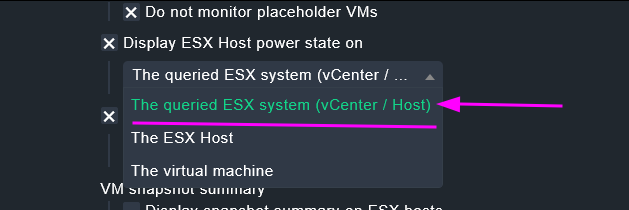
So, maybe one annoying bug here. That option (the “vCenter” one) causing error in the special agent.
Choosing the other “The ESX Host” makes it ok.

Upgrade from 2.3.0p29.

image

2 Likes

Hi Daniel!

Thanks for reporting.
If it is possible for you (if you have a support contract), could you please create a ticket for this?

Upd: we have an internal ticket for this. Will keep you updated.

2 Likes

Hi @DanielDS,
the (default) option you selected is indeed the only one leading to an error. I’m working on a fix…

Have a nice day

4 Likes