yes, without the connection between the neighbour host and the Checkmk host object, there is no inventory information and therefore no (usable) topology.
is Switch-21-6000-24G the exact name of the host object in CMK also? If yes, is there a LLDP inventory avilable inside CMK?
This is only nessecary for the L3v4 topology, CDP/LLDP will work without the labels.
As NVDCT is doing nothing in CMK (except for reading data) you are responsible to have the correct information in CMK available.
Issue 1: Fortinet uses a different format for MAC addresses than inv_lldp_cache knew → this is now fixed inv_lldp_cache-0.9.9-20240724.mkp
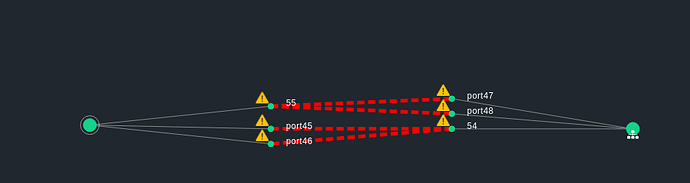
Issue 2: Fortigate has a “creative” way to use the LLDP data. Specifically, Fortinet enters the port aggregations in the LLDP table, without interface mapping for the local port to the LLDP port table, but only the interface index for the port aggregation. The remote ports are OK. In the topology it looks like this
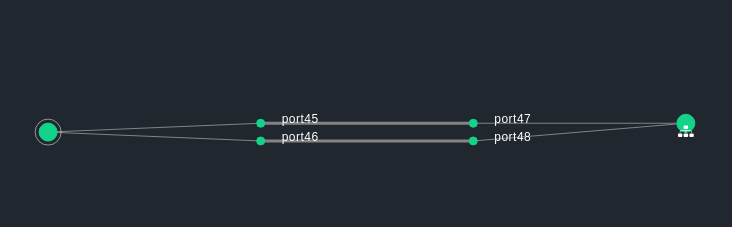
I have now added a tweak for Fortinet to inv_lldp_cache (not yet online). This will map the information for the port aggregation to the LLDP data. So the topology is ok.
The disadvantage is, that I have not yet found a way to read out which port from the port aggregation is actually connected to which neighboring port I simply map the first port from the aggregation to the first neighboring port, the second to the second and so on. So if anyone here has any ideas…
Hello I have trouble to get this running. We are currently running 2.3.0p10 version so according comments above this plugin is already included. I had already install additional plugins -cdp, lldp, inv_ifname and nvdct as well. HW/SW intentory is providing data - I can see cdp and lldp cache and neighbours. All host are Cisco switches, enable for monitoring including all services - ports.
Json file with cdp is generated but I can see any drop down menu to see network layer topology from aby of enabled hosts in site.
That’s another weird issue what i had noticed. After some time symlink @default is gone. Same with my custom config file located under ~/local/bin/nvdct/conf/.
Yes we have distributed setup for monitoring, correct. This mean all scripts and data must be executed in main / central server, although switches are monitored from slaves / satellite locations ?
Exactly - if you have enabled the sync of your mkp’s and other data, all changes on your remote instances are overwritten by your central system.
The tool from @thl-cmk fetches the needed data from the other instances. It is also important that the JSON file exists on the central system. Without this you will not see any icon in the GUI.
Thank you for guide ! It help !!
So i can have several different configuration for each site and run command separately, correct and data will be merged in to one json file ?
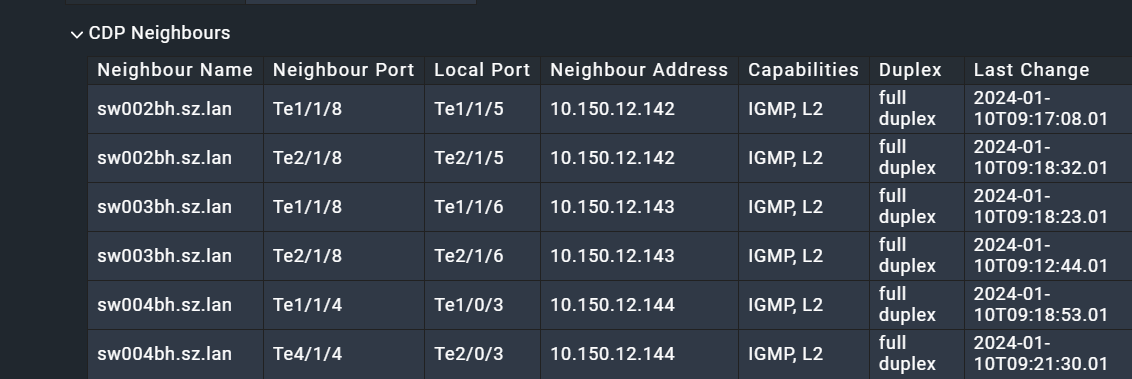
I have addtional question - we do have some site under Cisco prime management and it this case they have CDP Neighbours name in full domain format - see attached image (checkmk host are in short names only without domain). If i use HOST_MAP like below, result in error ? Should I use quotes then ? ( “sw001bh.sz.lan” = “sw001bh” )
NVDCT will automatically cut the domain name, except if you use the --keep-domain option. So as long as the hostname (without domain) matches the name in CMK you are fine.
Based on some comon issues I have created a little Troubleshooting guide. I hope this will help with the first steps. This not complete (yet). Based on the feedback here and the issues I run into my self, I will update the guide from time to time.
Hi Suman,
this is something for @thl-cmk , as the error message is triggered in his mkp.
As a short info. I haven’t had much time in the last few months to make further progress on the entire visualization project. There are some ongoing major refactorings in our monitoring GUI framework that are taking up all of my time.
Hopefully over the winter holidays I can make some updates and integrate the latest feedback.
I have the same issue. Tried adding --log-level DEBUG --log-to-stdout to the command but still get the same output on the screen but do get this in the log file.
2024-11-04 09:35:07,593 :: INFO :: nvdct :: () :: 609 :: Data creation started
2024-11-04 09:35:07,594 :: INFO :: settings :: sites() :: 544 :: fFound 0 to filter on
Not sure if this is the best over all fix but I changed line 387 in /opt/omd/sites/SITENAME/local/bin/nvdct/lib/backends.py and this fixed the error and was able to finally get data into the Network Topology.
‘customer’: data[‘customer’] # needed to filter by customer
to
‘customer’: data.get(‘customer’), # needed to filter by customer
I think this change is correct as you have only the customer attribute if you use a MSP edition of CheckMK.
I can ping @thl-cmk that he can implement this in his package.
Cool. I can’t take credit for it as it came from a ChatGPT suggestion but what was confusing is that I do have the MSP version. From what I understand it was not getting any data from the ‘customer’ values. I am not a programmer so I defer to the developer(s) to make sure this is correct.


 I simply map the first port from the aggregation to the first neighboring port, the second to the second and so on. So if anyone here has any ideas…


 ), but didn’t make it onto my website. It is now online.