Not yet if the switch name looks like this switch12(fdo123456) , but could be implemented.
Cheers
Thomas
Not yet if the switch name looks like this switch12(fdo123456) , but could be implemented.
Cheers
Thomas
This where great… I had a look at the source code but I’m not a super professional developer and not the time for this 
So if this will be an option… this will be great and help other users too 
Thanks
Frank
Hi @thl-cmk ,
I’m was able to implement a config switch remove_serial and remove the serial with a regex
Can I send you a push request or a diff or only the changed lines?
Cheeers
Frank
@FrankB sent you a PM.
@shresu there is nothing to configure for the interfaces. Basically, this means that NVDCT cannot assign the L2 data (CDP/LLDP) to the interface services in the CMK. You can see this in the log (~/var/log/nvdct.log). Search for lines like:
2024-11-17 10:13:22,146 :: WARNING :: topologies :: get_service_by_interface() :: 440 :: Device: SW-Rup02: service for interface |16| not found
2024-11-17 10:13:22,148 :: WARNING :: topologies :: get_service_by_interface() :: 440 :: Device: SW-RUP01: service for interface |2| not found
Here (How are port names mapped to interface service names?) you will find some high level information how the L2 data to Service mapping works.
Cheers
Thomas
Based on @FrankB idea I have added the new config section L2_NEIGHBOUR_REPLACE_REGEX to deal with more complex neighbor names.
Also starting with version 0.9.0-20240923 there where some incompatible changes in NVDCT:
0.9.0-2024-09-23:
--lowercase/--uppercase with --case LOWER|UPPERFILESYSTEM → use MULTISITE instead--new-format) → for CMG 2.2x use the 2.2.x branch (for now version 0.8.12)0.9.2-2024-11-17:
DROP_HOST_REGEX → use L2_NEIGHBOUR_REPLACE_REGEX insteadHOST_MAP → L2_HOST_MAPDROP_HOSTS → L2_DROP_HOSTSSEED_DEVICES → L2_SEED_DEVICESL2_SEED_DEVICES instead--keep-domain (keep_domain) to --remove-domain (remove_domain) → don’t mess with neighbor names by defaultAs always, read the changelog before updating 
Sorry for the inconvenience
Thomas
Hallo Thomas,
das sind mal tolle Neuigkeiten
Ich sag mal vielen lieben Dank. Werde es im laufe der Woche mal ausgibig testen
VG
Frank
Hi @thl-cmk !
First off, thanks for the cool plugins! I’ve followed the HowTo on your hopto link, but have a few issues. I’m on CheckMK Enterprise 2.3.0p17.
I can open the Topology view by using the Hamburger Menu next to individual hosts, that’s fine. But from what I’ve seen in screenshots there should be a dashboard to view the default topology (which exists, i checked in the filesystem. Only have one CMK instance, not distributed.). No dashboard for this was created and I couldn’t find a way to create it myself.
I did notice that all the MKP’s have some contents, especially GUI extensions, with (deprecated) next to them:
The Second problem is that, when setting up the filter for the topology view, the live search freezes when viewing the Topology from certain nodes as soon as I set the Topology Mesh Depth to 6. The Live Search on the top right will stay at “LS running…” and the topology won’t update.
At 5 it works without issue.
And last but not least: Have you thought about or found a way to map all those pesky MAC Adresses to IP’s and those to Host names? THeoretically it could be done via ARP + DNS queries. It would be awesome to know which of our Clients or Server-Hardware are connected to which Ports on the Switches.
Thanks in advance!
@Kevd thanks for the feedback send you a PM.
Version 0.9.4-20241210 of nvdct is online now. What has changed?
-l CDP or the config option[SETTINGS]
layers = ["CDP"]
instead.
the site filter works now also with the RESTAPI backend
added option --include-l3-hosts
this allows you to add single homed devices to the L3v4 topology
dual homed Linux and Windows hosts will added by default with the updated plugins.
This change nedds an update of the ip address inventory plugin(s)
The inventory plugins add IPv4 and IPv6 addresses to the inventory now.
Note: after the update you need to do a rediscovery of the host labels (cmk -IL && cmk -R) to use it with the L3v4 topology.
reworked STATIC topology
With this rework you can now easyly create (any) topology you want.
For this the configuration has changed from
[“left_host”, “left_interface”, “right_interface”, “right_host”, “label”]
to
[“left_host”, “left_service”, “right_service”, “right_host”]
Note: you can leave "left_service" and/or "right_service" empty ("")
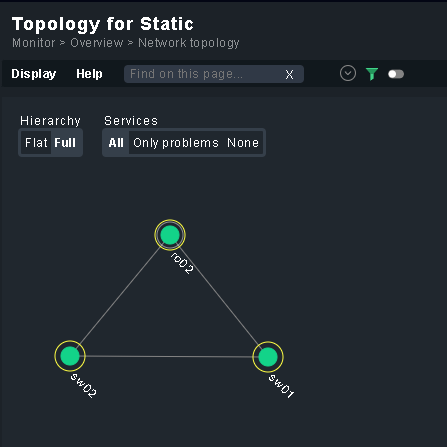
Here a little sample to just connect 3 hosts
STATIC_CONNECTIONS = [
    ["sw01", "", "", "sw02"],
    ["ro02", "", "", "sw01"],
    ["ro02", "", "", "sw02"],
]
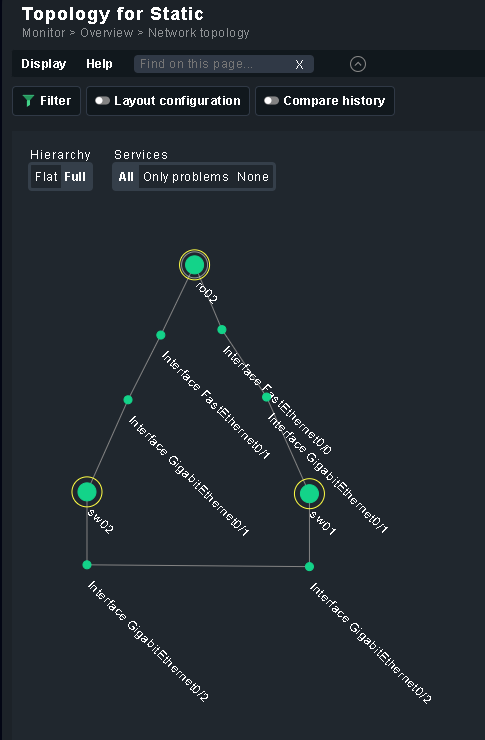
and with services
STATIC_CONNECTIONS = [
    ["sw01", "Interface GigabitEthernet0/2", "Interface GigabitEthernet0/2", "sw02"],
    ["ro02", "Interface FastEthernet0/0", "Interface GigabitEthernet0/1", "sw01"],
    ["ro02", "Interface FastEthernet0/1", "Interface GigabitEthernet0/1", "sw02"],
]
As always, before updating read the CHANGELOG
Cheers
Thomas
Hi together
@thl-cmk
small problem after update:
OMD[infra]:~$  ~/local/bin/nvdct/nvdct.py -u ~/local/bin/nvdct/conf/my-nvdct.toml -d
Traceback (most recent call last):
  File "/omd/sites/infra/local/bin/nvdct/nvdct.py", line 258, in <module>
    from lib.settings import Settings
  File "/opt/omd/sites/infra/local/bin/nvdct/lib/settings.py", line 5, in <module>
    from cmk_addons.plugins.bgp_topology.lib.utils import OMD_ROOT
ModuleNotFoundError: No module named 'cmk_addons.plugins.bgp_topology'
greetz Bernd
@BH2005 ThX for the feedback, is fixed now (copy&paste grr).
works … 
but no LLDP,STATIC or CDP Data
OMD[infra]:~$  ~/local/bin/nvdct/nvdct.py -u ~/local/bin/nvdct/conf/my-nvdct.toml -d

Network Visualisation Data Creation Tool (NVDCT)
by thl-cmk[at]outlook[dot]com, version 0.9.5-20241217
see https://thl-cmk.hopto.org/gitlab/checkmk/vendor-independent/nvdct

Start time....: 2024-12-17T12:05:41.12
Layer LLDP....: Devices/Objects/Connections added 0/0/0
Layer L3v4....: Devices/Objects/Connections added 33/391/424
Layer CDP.....: Devices/Objects/Connections added 0/0/0
Layer STATIC..: Devices/Objects/Connections added 0/0/0
Time taken....: 1.325134946/s
End time......: 2024-12-17T12:05:42.12
@BH2005 you only get STATIC if you have a static topology configured inside the config file (in your case my-nvdct.toml)
For LLDP/CDP, have you set the seed devices in the config file?
If you are updateing form a pre 0.9.2-2024-11-17 version of NVDCT you need to adjust your config file see → Network Visualization - #111 by thl-cmk, or check the CHANGELOG
The configuration for the STATIC topology has also slightly changed see → Network Visualization - #115 by thl-cmk
As I am more and more closing in to NVDCT version 1, I had still to make some adjustments.
0.9.6-20241222: streamlining the L3v4 stuff towards L3v6
L3V4_IGNORE_HOSTS → L3_IGNORE_HOSTSL3V4_IGNORE_IP → L3_IGNORE_IPL3V4_SUMMARIZE → L3_SUMMARIZEL3V4_REPLACE → L3_REPLACEL3V4_IRNORE_WILDCARD → L3V4_IGNORE_WILDCARD # Typo, last L3v4 only piecel3v4_replace → l3_replacel3v4_summarize → l3_summarizeI think, together with the IPv6 inventory, you can guess where this leads
0.9.7-20241230: more cleanup
INCOMPATIBLE: changes in TOML:
L2_DROP_HOSTS → L2_DROP_NEIGHBOURS: This is not about dropping CMK hosts but L2 neighbours so i had to rename it.
REMOVED:
CUSTOM_LAYERS section and CUSTOM layer: dropped support for custom plugins. As I am not aware of any third-party plugins, I will no longer maintain unused code.
CHANGED BEHAVIOR:
L2_SEED_DEVICES: if this section is empty, NVDCT will now use all hosts as seed devices (filtered by host label: CDP → nvdct/has_cdp_neighbour:yes, LLDP → nvdct/has_lldp_neighbours:yes)
NEW OPTIONS:
--adjust-toml : Since I also had to change some TOML files myself and to make the changes easier, I added a little helper. This will do most of the TOML changes for you.
OMD[build]:~$ ~/local/bin/nvdct/nvdct.py -u
~/local/bin/nvdct/conf/testing.toml --adjust-toml

Network Visualisation Data Creation Tool (NVDCT)
by thl-cmk[at]outlook[dot]com, version 0.9.7-20241227
see https://thl-cmk.hopto.org/gitlab/checkmk/vendor-independent/nvdct

Start time....: 2024-12-27T17:29:54.12
Checking file.: testing.toml
Found value...: "L2_DROP_HOSTS" 1 times, replaced by "L2_DROP_NEIGHBOURS"
Found value...: "L3V4_IGNORE_HOSTS" 1 times, replaced by "L3_IGNORE_HOSTS"
Found value...: "L3V4_IGNORE_IP" 1 times, replaced by "L3_IGNORE_IP"
Found value...: "L3V4_REPLACE" 1 times, replaced by "L3_REPLACE"
Found value...: "L3V4_SUMMARIZE" 1 times, replaced by "L3_SUMMARIZE"
Found value...: "SEED_DEVICES" 1 times, replaced by "L2_SEED_DEVICES"
Found value...: "icon_missinc" 1 times, replaced by "icon_alert_unreach"
Found value...: "icon_missing" 1 times, replaced by "icon_alert_unreach"
Found value...: "l3v4_replace" 1 times, replaced by "l3_replace"
Found value...: "l3v4_summarize" 1 times, replaced by "l3_summarize"
Found value...: "keep_domain = false" 1 times, replaced by "remove_domain = true"
Obsolete......: "lowercase", use "case = LOWER" instead
Obsolete......: "uppercase", use "case = UPPER" instead
Renamed TOML..: testing.toml.backup
Written fixed.: testing.toml
Time taken....: 0.009732051/s
End time......: 2024-12-27T17:29:54.12

OMD[build]:~$
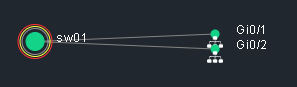
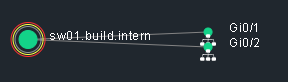
--display-l2-neighbours: With this option the Hosts in the L2 topologies will show the raw L2 neighbour name instead of the CMK hostname.
 →
→ 
--include-l3-loopback: Will include 127.0.0.0/8 and ::1/128 ip-addresses in L3 topology.
--skip-l3-cidr-0: Will skip /0 ip-adresses in L3 topology (if you dont want the “0.0.0.0/0” network).
--skip-l3-cidr-32-128: Will skip /32 (IPv4) and /128 (IPv6) ip-addresses in L3 topoogy.
--skip-l3-public: Will skip public ip-addresses in L3 topology.
Cheers
Thomas
0.9.8-20250205:
-u/--user-data-file is now -c/--config--pre-fetch option.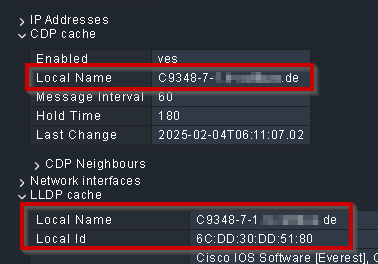
--l2-remove-domain, and --l2-case have now an ‘AUTO’ option. This basically tries out all possible options until it finds a match.--l2-skip-external: This removes all neighbours without a matching Checkmk host from the topology--l2-display-ports, --l3-display-devices: if this is enabled, the raw port/device name from the inventory will be used as the display name in the topology instead of the Checkmk interface service name.As always, check the CHANGELOG for full details before updating.
Cheers
Thomas
Hi Thomas, we’d love to try the newest version but instead of the repository, I’m redirected to gitlab’s login page. Is Sign in · GitLab still the correct URL or is there another issue?
Hi Fabian,
unfortunately there is an error in the latest MKP. As I am on leave I have taken the repo offline. It will be fixed next week and then become available again.
Thomas
@fabian.binder the repo is now online again.