OrbVis — a NagVis successor candidate (developer preview, feedback welcome)

Hi everyone,

we’d like to introduce OrbVis, a fresh take on monitoring visualization for Checkmk. OrbVis is a candidate for replacing NagVis in the Checkmk world, endorsed by Checkmk — but to be clear up front: this is a developer hobby project. No official support, no SLA, no release timeline. The code is open and we want you to try it.

See it live, no install needed

A read-only guest is parked on https://play.checkmk.com with a few example boards. Just click around — no credentials required.

What is OrbVis?

A modern web rewrite of “draw your infrastructure on a map and see live status”:

  • Backend: Python 3.12 / FastAPI / async SQLAlchemy / async Livestatus
  • Frontend: Vue 3 + TypeScript / Vite / Pinia / Tailwind / D3
  • Boards: static, worldmap, radar, flow — JSON-stored, WebSocket-pushed
  • Auth: OMD session SSO inside a site, htpasswd-compatible local users, JWT
  • Multi-site Livestatus (Unix or TCP), AuthUser filtering for contact-group visibility
  • NagVis import via GUI andtools/cfg_importer.py --batch
  • Full feature list and screenshots in the README

Checkmk integration

Tested informally on 2.3 / 2.4 / 2.5 / 2.6. The intended supported range going forward is 2.5 and up. When deployed into a site it lives at https://<host>/<site>/orbvis/ and re-uses the site’s Apache + OMD session cookie (login to Checkmk = login to OrbVis).

After installing the MKP, OrbVis registers a main-menu entry in Checkmk and ships an optional sidebar snapin that lists your boards — both feel native to the Checkmk GUI and respect the user’s permissions.

cmk-mainmenu

NagVis migration

OrbVis can import existing NagVis maps directly via the web UI — open the board overview, hit Import, drop in a .cfg file, done. No shell access required. For bulk migrations there is also a CLI helper (tools/cfg_importer.py --batch) that walks a whole etc/nagvis/maps/ directory.

The importer covers the common cases — hosts, services, host-/servicegroups, lines (incl. weathermap coloring), shapes/images, textboxes, and the stock speedometer/bar gadgets. Custom hover/context templates, container objects, custom PHP gadgets and geomap are not migrated yet. Icons and background images still need to be copied across by hand.

If you have NagVis configs in production, please try the importer and tell us where it falls short — that’s the feedback that will move the project forward fastest.

Try it on your own infrastructure

The MKP is the primary install path (one Checkmk-major-specific MKP per release, .deb/.rpm and Docker are also available). Pre-built artefacts live on the Releases page; the install matrix is in docs/install.md.

For Checkmk 2.5 you can also download the latest release on the Checkmk Exchange:

What we’d love feedback on

  • Does the NagVis import cover your maps?
  • Does OMD SSO work cleanly on your setup?
  • Is the board editor good enough to replace your NagVis workflow?

Repo / issues: https://github.com/makanakoeln/orbvis
Checkmk Exchange (2.5 only): Checkmk Exchange
Discussion: please reply in this thread
Open issues: Issues · makanakoeln/orbvis · GitHub
Fixed issues (on next mkp release): Issues · makanakoeln/orbvis · GitHub

22 Likes

Regarding the name, I’d like to point out that there are already two other unrelated projects, named OrbVis, which might cause confusion and probably should be re-named.

wojciech-graj/OrbVis: Realtime Satellite Orbit Visualizer

staradutt/orbvis: OrbVis is a lightweight Python package for plotting orbital-projected bandstructure and density of states(DOS) from vasp output files (PROCAR & DOSCAR).

Kind regards, Dirk.

4 Likes

Thanks for pointing this out, Dirk.

OrbVis is currently a private working project — it’s not published on PyPI, npm or any similar registry, so there’s no package-name collision with either the satellite-orbit visualizer or the VASP plotting tool.
Given how different those domains are from monitoring visualisation, confusion in practice should be minimal.

Should this ever be integrated into Checkmk upstream, the name would most likely be reassigned at that point — until then “OrbVis” stays as the working title.

I’ve added a short note to the README acknowledging both projects.

2 Likes

Nice! :+1:

Got it running in minutes and after half an hour or so most things seems to work properly. Pretty intuitive, too.

Only exceptions till now: Added custom images don’t show up and an imported NagVis Automap doesn’t show any objects (not sure if Automap import should be possible at all).

Looking forward to hearing more from this!

1 Like

Thanks, Mirco, for the first feedback :slight_smile:

Would need more details.
I can upload a custom icon and it shows up (static board)

Think this just a small bug in the importer. Would be imported as Flow Board.
Will create an issue for this :white_check_mark:

In general, feel free to open an issue/feature request on Issues · makanakoeln/orbvis · GitHub .
If not possible, i will do it. Just to keep track of bugs and missing features.

1 Like

Ah - my fault!

After uploading an image I just clicked on “Place on board” - and have overseen that the uploaded image becomes part of the default icon list and has to be selected. Therefore I got just some placeholders.

Everything’s working now, thanks!

MKP for 2.5 is now also available on the Checkmk Exchange:

3 Likes

Hi @_rb,

very cool project!

Currently, we installed the MKP in 2 environments, one using Checkmk 2.5 and one using Checkmk 2.3.

In Checkmk 2.5, we got it running quite easily. The interface looks and feels great so far.

What we’d still love to see:

  • Hovering over a Host Icon does not show a preview of the CRIT services of a Host. NagVis did that and it was quite convenient to see the Service Problems directly. Would be great to have this as an option again!
  • The information which user created a map / board. NagVis unfortunately also did not track which user created a map, and for our large customers it’s causing a headache because they cannot find out who is responsible for which map. Maybe an “author” field in the board’s data structure could resolve this issue…

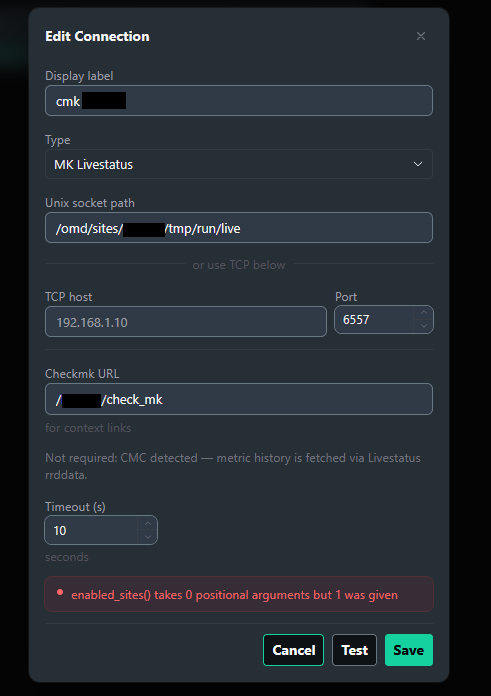
On the version for Checkmk 2.3 however, we’re having problems getting OrbVis to run. We imported our old NagVis maps by using the “cfg_importer.py --batch” tool. The import seems to be working fine, however the livestatus backend stopped working after doing the import (and restarting the Checkmk site).

The “Edit Connection” dialogue shows a configuration that looks fine at first glance. But it auto-fills Port 6557 in the TCP section, which leads to the following error message when trying to test the connection:

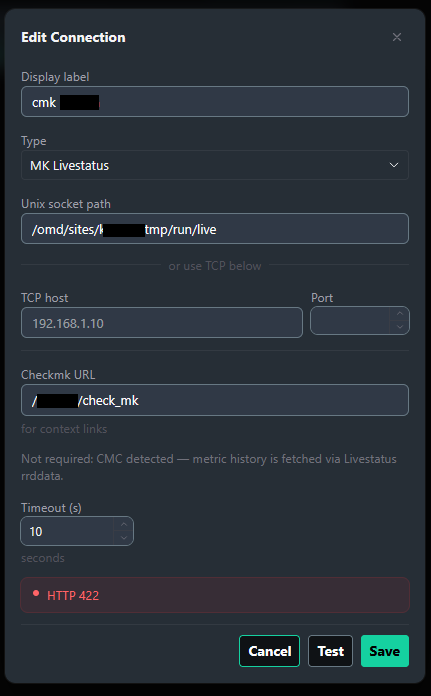
I assumed the the pre-filled Port 6557 might cause an issue because TCP should actually not be used. But removing Port 6557 here just leads to a different error message:

Any idea what might cause this issue in 2.3?

Best regards
Fabian

Hi Fabian,

Thanks :slight_smile:

Already implemented something like that, will be available in the next release

I will have a look. Sounds like a good idea.

This is “just” after an import?
I will have a look and keep you updated

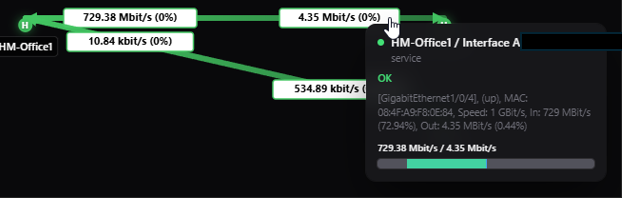
I really like the tool so far. I have created a static board, but the utilization percents are not working in the line labels even though they are in the hover box. I would like to use weathermaps if I can get this to work.

Also, I would like to be able to pan and zoom with the mouse in the static board just like with the flow board.

thanks. Will be fixed with the next release

Hello,

This is a really nice project that’s fully integrated into Checkmk. Great!:+1:

I’ve discovered a few things while importing my Nagvis maps:

  • My maps are all designed so that the lines are linked to the objects, but this doesn’t work because the devices in Orbvis no longer have IDs. Therefore, all lines are at 0:0 after import.

  • The Z-axis isn’t being imported; my host devices are now all behind my text boxes.

  • The text box sizes are incorrect because the values ​​entered in Orbvis were used in “auto”.

  • The label names of the lines weren’t imported.

  • The label settings of the devices aren’t being imported. I now have white text on a light background. It would also be great if you could choose a background color instead of just a background image.

  • Multiple backend servers on one map don’t work.

  • Not all services are available for selection on the devices.

Regards, Sebastian

1 Like

great feedback, thanks!

Would it be possible that you send me some of your maps via PM?

Hello,
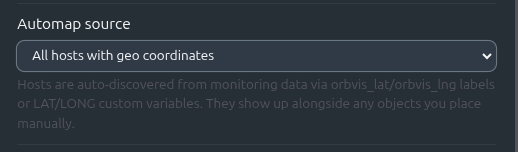
In our Test environment I use the checkmk appliance. I installed OrbVis and I can see the geomap and all example boards. All host have the custom variable lat and long set.
How can I get now the hosts added to the OrbVis geomap? Right now I can add them manually.

will be available with version 0.2.0 as geo board setting

1 Like

I’d love to, but it’s not working.
Could you send me your email address, or is there another way?

Release 0.2.0 is now out for testing.

Why not 0.1.1?

It’s not only about fixing bugs, it’s also a lot about fitting the needs of an operator, working with Checkmk and visualization. Get an overview, find the problem and get a detailed view about what’s wrong in your environment. You will find many improvements in this direction, beside fixed bugs.

What changed?

Try it yourself. You can see version 0.2.0 already live on play.checkmk.com
Details are listed in the changelog—or… among many other improvements: simply click on an object on any board type. :melting_face:

What about my feedback?

I tried to tackle all mentioned problems, please check if your problem is fixed. Otherwise, reply in this thread

Where can i find it?

Checkmk Exchange: Checkmk Exchange (should be updated tomorrow - 2.5 only)
Github: https://github.com/makanakoeln/orbvis/releases/tag/v0.2.0

How to update?

OMD[SITENAME]:~$ orbvis-setup uninstall && mkp disable orbvis && mkp remove orbvis && mkp add /tmp/orbvis-cmk-2.X.mkp && mkp enable orbvis && orbvis-setup

or

via extension packages

* upload
* disable v.0.1.0
* enable v.0.2.0
* "orbvis-setup" as site user on command line

:red_exclamation_mark: in both cases Str+Shift+R might be needed in the browser :red_exclamation_mark:

Hope you enjoy

2 Likes

Hello,

I really appreciate your work on this, and I am glad to see a good replacement for the old NagVis coming along.

The main problem with NagVis for us is that maps cannot be separated by remote sites. With around 300 remote sites, we would end up with so many maps that the snapshot becomes too large, and activating changes runs into timeouts. That is why we do not offer NagVis in either of our monitoring environments.

How are the maps organized in OrbViz? Is everything managed centrally on the master and then transported to the remote sites via snapshots, or is OrbViz managed decentrally on each remote site?

Thanks,

Mike

2 Likes

Hi Mike,

OrbVis is currently designed to run only on the central site (showing data from remote sites).

Up to now, OrbVis still puts everything under $OMD_ROOT/local/share/orbvis/` — boards, DB, venv, frontend bundle. That path is in the replication path, so it does end up in the WATO snapshot. On a handful of sites that’s fine; on 300 it would be exactly the failure mode you described for NagVis.

For one of the next versions I’m planning to move data and install artefacts to $OMD_ROOT/var/orbvis/ and the admin config to $OMD_ROOT/etc/orbvis/.env. Neither path is in the replication paths, so Activate Changes should ignore OrbVis entirely.

A customer/DMZ remote that can’t reach the central site can install OrbVis locally and keep its own boards. Activate Changes from the central will leave that installation alone.

As i said, single-site testing works fine on the current release if you want to evaluate it — just hold off on rolling it out to all 300 remotes until the relocation is in. I’ll post here when it ships.

We definitely need to keep this in mind if it ever ships with Checkmk.

2 Likes