Hello, I’m really hoping for some help after updating my dev site to 2.4. I am getting the following on some of my vmware esxi hosts (6.0). Strangely enough, My 2x 5.5 hosts do not have this problem. All hosts are using the same rule that has SSL check disabled. All of these hosts are using the default vmware cert.
This is on a fully patched Ubuntu 22 server.
I exported the cert and tested it on Comodo’s cert checker tool and it shows as valid with no errors ?
Anyone have any ideas?
HTTPSConnectionPool(host=‘192.168.x.x’, port=443): Max retries exceeded with url: /sdk (Caused by SSLError(SSLEOFError(8, ‘[SSL: UNEXPECTED_EOF_WHILE_READING] EOF occurred in violation of protocol (_ssl.c:1010)’)))CRIT , Missing monitoring data for all pluginsWARN , execution time 0.6 sec
Output of “cmk --debug -vvn hostname”:
[special_vsphere] Agent exited with code 1: HTTPSConnectionPool(host=‘192.168.x.x’, port=443): Max retries exceeded with url: /sdk (Caused by SSLError(SSLEOFError(8, ‘[SSL: UNEXPECTED_EOF_WHILE_READING] EOF occurred in violation of protocol (_ssl.c:1010)’)))(!!), Missing monitoring data for all plugins(!), execution time 0.6 sec | execution_time=0.640 user_time=0.040 system_time=0.000 children_user_time=0.440 children_system_time=0.070 cmk_time_ds=0.100
This is the real problem - not your self signed certificate.
Here this issue discusses the problem a “little” bit more.
It looks like that it is a cipher problem.
personally I am fine with the old cert, The main thing is that I don’t think the “deactivated SSL cert checking” setting actually works. Also, I am surprised to hear that esxi certs are “too old” when esxi 5.5 certs work.
It is not the certificate what has a problem. It is the cipher suite that the system tries to use. The 5.5 ESX only works as it is not supporting TLS 1.2 but only 1.1 and 1.0.
For TLS 1.1 your systems uses the same ciphers as the server is providing, that’s the reason why it works.
There is a nice little nmap script that can list all the ciphers a server is providing.
nmap -sV --script ssl-enum-ciphers -p 443 <host>
Sample output
PORT    STATE SERVICE  VERSION
443/tcp open  ssl/http OpenResty web app server
| ssl-enum-ciphers:
|   TLSv1.2:
|     ciphers:
|       TLS_ECDHE_ECDSA_WITH_AES_128_GCM_SHA256 (secp256r1) - A
|       TLS_ECDHE_ECDSA_WITH_AES_256_GCM_SHA384 (secp256r1) - A
|       TLS_ECDHE_ECDSA_WITH_CHACHA20_POLY1305_SHA256 (secp256r1) - A
|     compressors:
|       NULL
|     cipher preference: client
|     warnings:
|       Key exchange (secp256r1) of lower strength than certificate key
|_  least strength: A
In the end you need to modify your openssl config to support the old unsupported ciphers.
In your monitoring site you can check in python this.
python3
from urllib3.util.ssl_ import create_urllib3_context
ctx = create_urllib3_context()
for cipher in ctx.get_ciphers():
    print(cipher["description"])
You should get a list of ciphers that your system knows.
These are not all ciphers your system knows only the ciphers that are available inside python without specifying something else.
At the bottom of your list you have the weak ciphers that your server support.
But as I’m no crypto expert, i don’t know why it is not doing in your case.
An update:
This is what I get when I do an openssl connect from that box to my affected vmware hosts (at bottom). Some are saying this is a bug with curl and openssl v3 on ubuntu 22.
There is documentation of a way around this by adding the following option to the openssl.cnf file
Options = SSL_OP_IGNORE_UNEXPECTED_EOF
but there are a ton of openssl.cnf files on the checkmk server, and I can’t tell which one is being used by 2.4, and I have no idea where to add it within the file, but I am still doing research.
All I know is this: I have 2 checkmk sites on this same server. The 2.4 site has this problem, the 2.3 p30 site is clear. To me, that eliminates common shared files as the culprit, but I may be wrong. I also really do think the disable cert check in the vmware module doesn’t work.
New, TLSv1.2, Cipher is AES256-GCM-SHA384
Server public key is 2048 bit
Secure Renegotiation IS supported
Compression: NONE
Expansion: NONE
No ALPN negotiated
SSL-Session:
Protocol : TLSv1.2
Cipher : AES256-GCM-SHA384
Session-ID:
Session-ID-ctx:
Master-Key: FBE8775DF546726…2A4065A784FF1E964E04A46703F2E0
PSK identity: None
PSK identity hint: None
SRP username: None
Start Time: 1746623070
Timeout : 7200 (sec)
Verify return code: 21 (unable to verify the first certificate)
Extended master secret: no
800BCA0C457F0000:error:0A000126:SSL routines:ssl3_read_n:unexpected eof while reading:…/ssl/record/rec_layer_s3.c:317:
(Verify return code: 21 (unable to verify the first certificate)) - as for this message, even my esxi v8 hosts get this and pass the openssl test.
Obviously, when I do this exact same test with openssl 1 on ubuntu 20, it passes, and uses the same cipher.
I hope this helps. I think this will be affecting many more users than just me, once it really starts getting deployed. A lot of old vmware servers still in the wild.
Another update -
on this 2.4 dev site, I only have it updating manually now as its the mirror of the main site, and there are many devices that I don’t want to be queried by 2 checkmk sites (dev and prod) at once. I just noticed that all of my vmware servers are not receiving data. Even doing a service detect shows all of the hardware (cpu use, memory, network etc) as vanished. Definitely something larger going on IMHO.
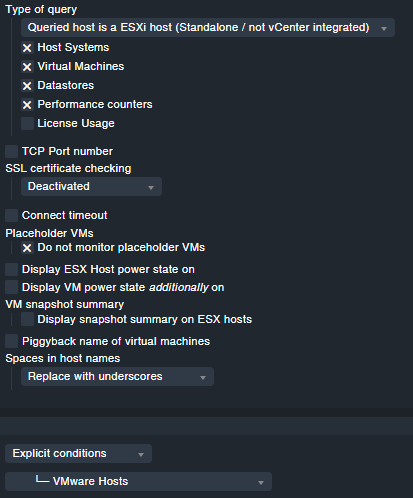
I built a new ubuntu 22 server VM and started with 2.4 raw and a completely clean config. 1x esxi 6 server, 1x esxi 8 server, and the vmware special agent rule applied to those explicit hosts. I have the vmware “type of query” set correctly for a single esxi host. The esxi 6 fails with the same SSL error as expected, and interesting, the esxi 8 does not fail, but is missing most of the actual important metrics on a service discovery.
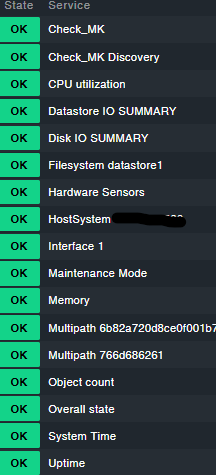
what the server shows on raw 2.3p30
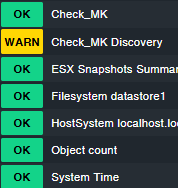
what the server shows on raw 2.4 with exactly the same settings
I was able to lower the SSL/TLS level of the connexion for the vSphere agent, which fix the “UNEXPECTED_EOF_WHILE_READING” issue. But I notice the same problem as Chris regarding the number of metrics available compared to 2.3.
Here is as a POC (hence the rough code) the changes in cmk/special_agents/agent_vsphere.py following line 1075, after urllib3.disable_warnings(category=urllib3.exceptions.InsecureRequestWarning) (the positioning directly in the part where the certificate check is False is for my convenience).
Ideally the Checkmk devs would add an other parameter, similar to “SSL certificate checking” in the UI, but for the SSL/TLS security level (here I put it at 0, also for convenience), and use for exemple the same HTTPAdapter HostnameValidationAdapter for both cases (cert_check or not).
            # Lower the SSL/TLS level of the connexion
            class CustomSSLContextHTTPAdapter(requests.adapters.HTTPAdapter):
                def __init__(self, ssl_context=None, **kwargs):
                    self.ssl_context = ssl_context
                    super().__init__(**kwargs)

                def init_poolmanager(self, connections, maxsize, block=False):
                    self.poolmanager = urllib3.poolmanager.PoolManager(
                        num_pools=connections, maxsize=maxsize,
                        block=block, ssl_context=self.ssl_context)

            from urllib3.util import create_urllib3_context
            ctx = create_urllib3_context()
            ctx.load_default_certs()
            ctx.set_ciphers("DEFAULT@SECLEVEL=0")
            ctx.check_hostname = False
            self.mount(service, CustomSSLContextHTTPAdapter(ctx))
            #
 and only 1.0 is used here i think.