Damn, I literally only upgraded all our ILO’s 2 weeks ago to troubleshoot this issue! I guess I can hit the problematic ones first and see how it goes.
Just for clarification, we have a total of 11 ILO’s.
6 of these are on the same network subnet as the CheckMK server, and I’ve narrowed it down to 5 out of 6 ILO’s on this site having issues.
The other 5 are on other sites, reachable across an SDWAN VPN and dont seem to be having any problems.
ALL of them are on the exact same version with the exact same config and API usernames.
I’ll try updating the problematic ILO’s to the newer version.
Upgraded all of the ILO’s that are having issues and they are still having the same issues 
I am going to give up soon!
Can you please sent me a crash report from one of the problematic hosts?
I have no idea what is the real problem in your environment.
How would I get the crash report? Not sure I’ve grabbed one of these before - is it the same process as collecting support diags?
After leaving it a while, I just saw another one of the previously working ILOs started crashing now.
The original ILO that doenst seem to have any issues is still not having any problems. Such a weird issue! I just cant see any reason why Redfish would be crashing everywhere except one single ILO.
Just an update here - I have been messaging Andreas directly but this may benefit anyone else reading (and my support ticket!)…
We ran some more debugs - the command does not crash directly when running from the site CLI, however it does seem to occasionally get stuck with an invalid login session on the ILO.
To rule this out, I created a brand new account on all of our ILO’s and removed the old one. Updated the Redfish rule and ran a tabula rasa on all our ILO hosts, but unfortunately immediately had the agent crashing out every 5 minutes just as before.
I have now created a new test site in omd, which is completely clean, and I’ve enabled the built-in Redfish extension that is shipped with CMK (v2.3.38) and it looks like this is also having the exact same issues.
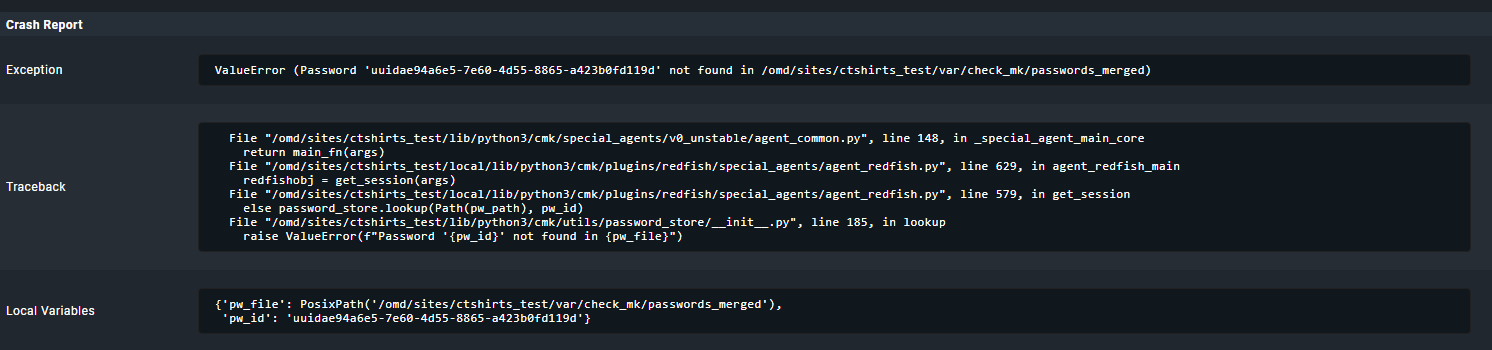
The crash reports on my test site are all basically the same - not sure what this means though:
I had the last days also some iLO5 with an auto logoff problem.
There i unselected the “storage” section from the section that i want to retrieve and the problem was gone.
Please try it with one of your systems.
Storage section is only needed for iLO6 and all other vendors but not the HPE iLO5.
The only login timeout configuration I can find on the ILO’s is an idle timeout, which is set to 30 minutes.
We’re seeing the issue every 5 minutes. But its not happening to all ILO’s. It’s weird though, since none of these issues happened on the old version of CMK, which is why I dont think it was a config issue on the ILO - most config is default.
With the storage section, are you referring to the check rule?
Doing some more checking on this - it appears that the agent isnt crashing. I have re-added one of the problematic ILO’s and all I can see is that the redfish agent just exits and all the services it previously found go stale.
Is there a way to get some verbose output as to why the agent is exiting?
It is not a login timeout problem.
It only affects iLO5 i think and only some with older storage controllers.
The old iLO Redfish checks where not using a stored session. They created every time the agent runs a new session. That takes time and as an optimization i made the session to be used again the next run.
For iLO5 i would test with a selection like this.
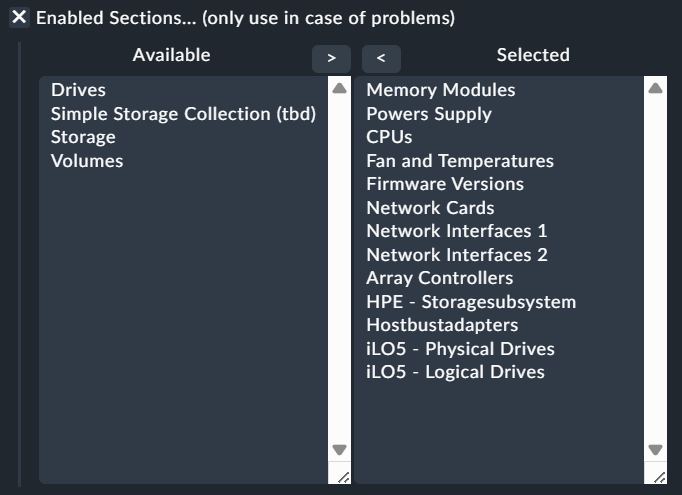
Don’t pay to much attention to the naming of this option. It is from my dev system with some clarification 
I cant seem to find any setting in the ILO relating to auto logoff. Any suggestions?
I think we might be heading in the right direction here. Still dont know why only some of them are having this issue, but this has to be what the problem root cause is. The only thing I dont know is how to resolve it. I’ve already checked for any session management settings on the ILO and found nothing, and all of them have the latest firmware, they have been rebooted, and all have identical config.
Done!
The logoff happens automatically if the special agent tries to fetch some data.
That is a very strange behaviour and was only solved at the system with disabling the “storage” section as i showed in my screenshot.
1 Like
OMG - this whole time, this was what the issue was! I removed the storage checks from the redfish rule and now the ILO monitors are behaving/not crashing out.
However, it is now missing all the disk information from my hosts.
Think this might get fixed in a future version?
Oh that is strange. You only disabled the storage section nothing else?
This is my rule currently:
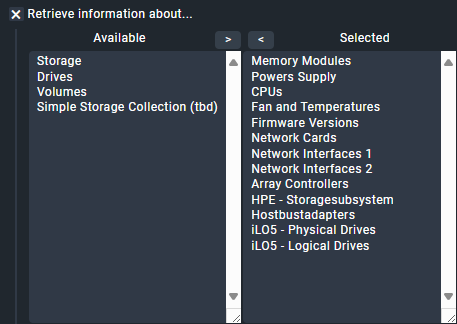
Basically just copying what you mentioned above. Doesnt seem to be discovering any disks, only the storage controller.
You can try if it not crashes if you keep “Storage” as the only one on the left side.
1 Like
Tried it, the drive checks re-appeared but the agents went back to crashing out again
I made a new version of the Redfish mkp with a slightly different handling of not correct delivered data.
Please can you try if here the same problem exists.
Hi Andreas,
Sorry for the lack of replies - I am preparing for a datacentre move, so extremely busy. I tried the latest version 2.3.49 and it seems to have improved - rather than timing out, when I select storage and drives it now shows a specific issue with that module:
When I deselect storage/drives/volumes, it goes away, but I also lose monitoring of all the drives on the host, including the storage controller and SD card/USB RAID array (which we would very much like to monitor as this is a common failure point).
same here, after upgrade to CMK 2.3 it was running fine.
now we updated ilo to the newest version and if I use the plugin or the implemented redfish I also missing the storage drives in the monitoring