I’m considering deploying Checkmk in our company but I’m not quite convinced about adding a few vcenters to it.
There is a blog called “vmware-monitoring-with-checkmk” but it’s lacking information.
Example: when you add a vcenter in Zabbix, you get many VM metrics out of the box (“Items collected”) eg: Free disk space on , Uptime, etc.
On checmk, after you add vcenter and after you add the VM as a “host”, you only get to see 10 “checks”: “esx_vsphere_vm_running_on”, “esx_vsphere_vm_name”, etc. None of them seem to address disk usage. Am I missing something or is this not available out of the box?
The vSphere special agent only retrieves information on hosts, VMs, datastores, etc.,
not the information on disk usage or processes etc. inside the (PhotonOS-/Linux-based) vCenter appliance. You could install the normal Linux agent inside the vCSA appliance, but …
I’ve added a vcenter using “Type of query selection to ‘Queried host is the vCenter’.” which is showing me datastores, esx systems, etc but it only shows me the powered state of each VM, example:
Based on your blog: "Checkmk uses the piggyback mechanism, with which it transfers information based on the host names to the appropriate hosts in the monitoring. This can be, for example, the data on the individual VMs from the ESXi host or vCenter.
However, to do this, you must first create the VMs as hosts in Checkmk, since they are currently only visible as services within your vCenter server. The host names in Checkmk must correspond to the display names in VMware. Only then can Checkmk correctly assign the piggyback data."
That’s what I did, I added one of the VMs (the same one in screenshot above) as ‘host’ and this is what I see:
As you can see there is nothing related to that particular VM about Disks. What I’m wondering if I am missing services or that’s all Checkmk is able to retrieve from vcenter.
Okay, I got you.
Then you are correct, we do not monitor the disk usage per VM.
You have the data stores from the vCenter and the file systems from within the VM.
It might be nice to have, but I am curious about your use case and if the vSphere API even provides that information. Would you mind elaborating a little?
These are some of the things you can retrieve from the vSphere API:
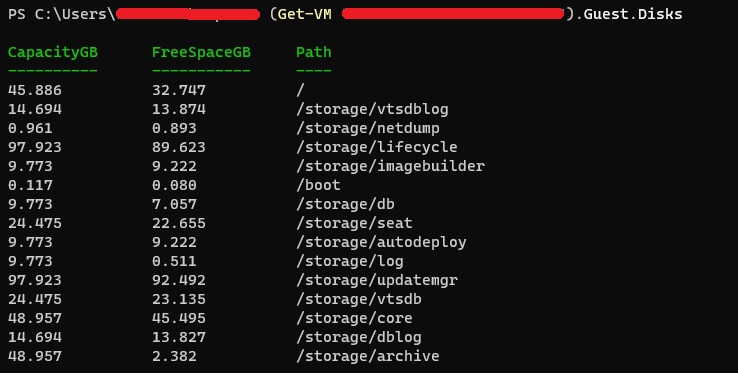
Also, if the VM has VMware Tools installed (which most of them do, if not all) you get to see even more metrics like per disk usage. Example from one of our VMs using powercli:
With that being said, if you have a thousand VMs in your vcenter, using only the vcenter rule you could be able to extract OS, Memory, CPU and Disk Usage without having to install individual checkmk agents on each VM.
Thanks for the information.
You are referring to PowerCLI, not sure if that’s available directly on the API.
Anyway, that is not the main point.
Let me make one point very clear: Although it seems tempting to monitor everything just from the vCenter, it is not sufficient at all. You always want to roll out the Checkmk agent. It gets the view from the operating system, both on hardware resources and services, processes. Additionally, you can easily extend the agent to whatever you need it to do.
I am not saying, that our vSphere monitoring has no room for improvement. I am merely saying that the information you are missing can and should be fetched through the Checkmk agent.
PowerCLI leverages vSphere API, it just displays data in an easier to read format for my example.
In our vCenter we have a lot of appliances (most of them running Photon OS). These are normally official VMware templates. In the past I’ve tried installing Prometheus in one of our NSX appliances but I was having issues with it. I raised a SR with a VMware Engineer and this exactly what their response was:
“It is not recommended to Install Third party Software/Application/Agents directly on the NSX-T appliance operating System.”
I’m not against installing agents but in certain circumstances it’s not advisable to do, especially when you have multiple appliances (vCloud,vCenter,VRO,vROps,tenant App, etc). I’m hoping you guys can come up with something similar to what Zabbix is doing when integrating vCenter to their platform. I appreciate your time.
This topic was automatically closed 365 days after the last reply. New replies are no longer allowed. Contact an admin if you think this should be re-opened.