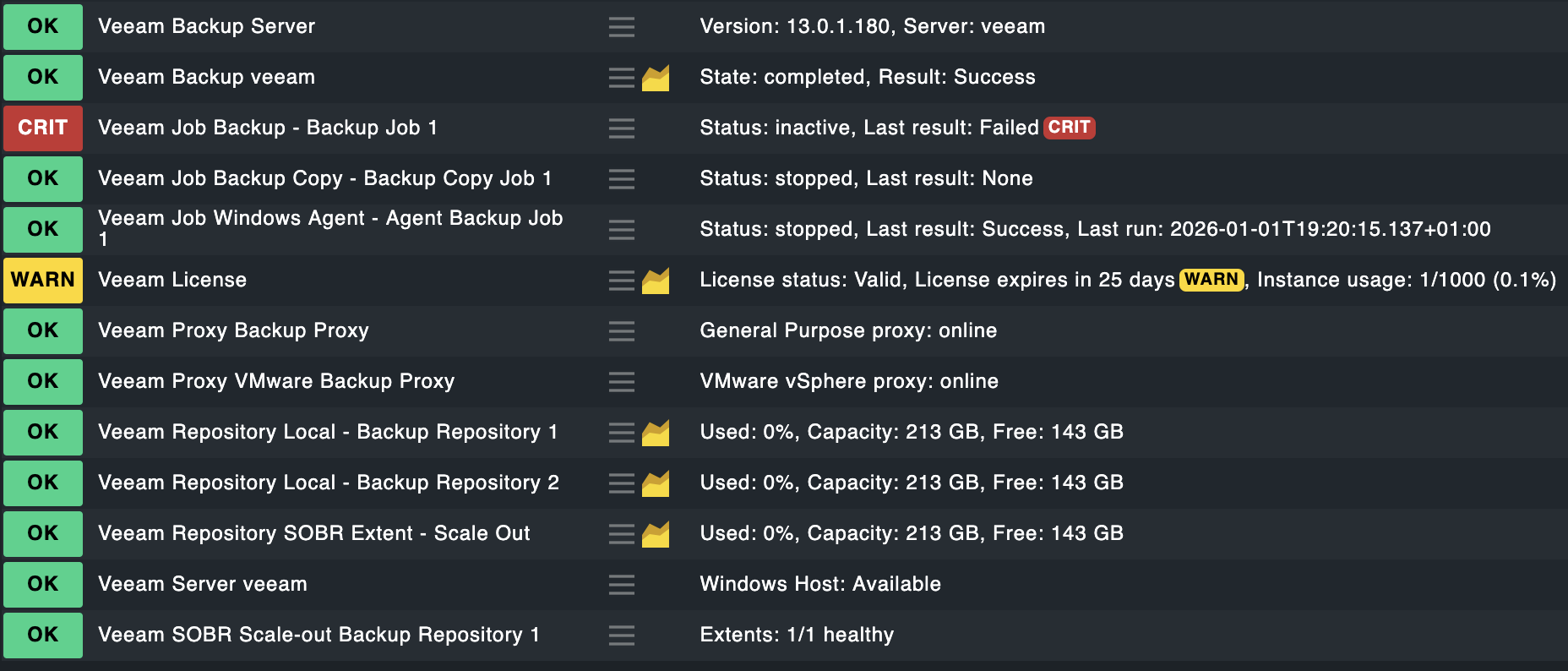
Hello,
After updating Veeam Backup to version 13, I can no longer monitor backup jobs as before. Does anyone have a solution for how to perform this monitoring?
Hello,
After updating Veeam Backup to version 13, I can no longer monitor backup jobs as before. Does anyone have a solution for how to perform this monitoring?
Hi Lucas,
there was a thread about this in the german sub-forum, the newer veeam 13 powershell modules need a current powershell and checkmk triggers and older powershell, the workaround seems to be a wrapper script: Veeam Backup & Replication 13 Support? - #3 by marcquark
Gerd
A colleague of mine has just modified veeam_backup_status.ps1 to query the installed Veeam version, derive the required PowerShell version (Veeam ≥ 13: PS 7, Veeam < 13: PS 5), compare the version it’s running under with the required version & re-start the script with the required PowerShell version if they differ.
We distribute it by disabling the built-in Veeam agent rule & distributing it as a custom plugin script via a rule of type “Deploy custom files with agent”.
You can get the customized version here. We do not plan on distributing it or creating an MKP for it; I’m hopeful official support will come soon.
According to what you sent here, it is now working for me.
I would like to thank you for your support.
This line
[int](Get-Process | Where {$_.Name -like "*Veeam.Backup.Service*"}).ProductVersion.Substring(0,2)
does not deliver a proper result and the script always assumes Version 13.
That’s interesting. The script as-is is used across our whole setup, mixed Veeam 12 & 13. Therefore it should be OK? As far as I understood my colleague the Veeam 12 cmdlets require PowerShell 5 & just don’t work in PS 7. So far none of the Veeam servers we monitor showed failures with the modified script.
Can you elaborate?
That is more than curious:
We monitor 55 Veeam servers, of those a very small number is 13, an even smaller number is still 11, and the vast majority is 12 (12.3.1.1139 & 12.3.2.3617, to be precise). This modified script runs on all of them, and if it didn’t work on them I would certainly have seen it in tons of unknown/vanished services. Granted, I haven’t run the PowerShell Get-Process … .ProductVersion on all of them, but still. I’m rather confused about your system’s behavior & have no good idea what’s going on.
Is it possible that your agent is not running as Local System?
If i do the Powershell line in a shell without admin rights i get also an empty output.
With a proper admin shell the version is reported correctly.
The ProductVersion property should be available for nearly all processes. The check_mk_agent process should report the installed agent version.
Admin privs do seem to make a difference for me, too. Without them .ProductVersion is empty/undefined/whatever, with them they’re present. My agents are all running as Local System, therefore I don’t see the problems that Stefan sees.
Yes, we ran everything in an elevated shell (pwsh/powershell/cmd) and agent is running as SYSTEM.
We worked around our(!) problem with locating the Veeam.Backup.Manager.exe and reading the version from this executable.
Thanks and have a nice day
My colleague & I discussed reading the version from the file, too, but concluded that the install location is definitely not fixed, even though it’ll vary rarely. Using the service seemed safer to us.
The fix did not work for me:
PS C:\Program Files (x86)\checkmk\agent\plugins> .\veeam_backup_status-temp.ps1
Ausnahme beim Festlegen von “buffersize”: “Die Puffergröße kann nicht festgelegt werden, da die angegebene Größe zu groß oder zu klein ist.
Parametername: value
Der tatsächliche Wert war 150,300.”
In C:\Program Files (x86)\checkmk\agent\plugins\veeam_backup_status-temp.ps1:18 Zeichen:1

$pswindow.buffersize = $newsize

~~~~~~~~~~~~~~~~~~~~~~~~~~~~~~~

CategoryInfo          : NotSpecified: (

, SetValueInvocationException

FullyQualifiedErrorId : ExceptionWhenSetting

SetValueInvocationException: C:\Program Files (x86)\checkmk\agent\plugins\veeam_backup_status-temp.ps1:18
Line |
18 |  $pswindow.buffersize = $newsize
|  ~~~~~~~~~~~~~~~~~~~~~~~~~~~~~~~
| Exception setting “buffersize”: “Cannot set the buffer size because the size specified is too large or too small. (Parameter ‘value’) Actual value was 150,300.”
Write-Error: Totally unexpected and unhandled error occured:
Item:
Error Message: TooManyRequests:
PS C:\Program Files (x86)\checkmk\agent\plugins>
If I increase the size, I only get this error:
PS C:\Program Files (x86)\checkmk\agent\plugins> .\veeam_backup_status-temp.ps1
Write-Error: Totally unexpected and unhandled error occured:
Item:
Error Message: TooManyRequests:
The resize of the frame buffer is not working inside a normal shell window.
For manual testing you can comment these lines. They are only important for headless execution to define the virtual shell size.
Yes sure - I tried in system context as well to figure out why I get no response from the agent. I think it’s this error which happened in general for me:
Error Message: TooManyRequests:
Edit:
Ok I realized that the script is workin on my Veeam 13 Community Edition Servers, but not on my Backup & Replication 13 Server.
Maybe its time to rewrite this whole thing into a REST based check, i will see, what I can do in the upcoming holidays.
Should (finally) be possible in Version 13 to rewrite everything for the REST-API. Version 12 only supported VMware vSphere backup jobs, VMware vSphere replication jobs and VMware Cloud Director backup jobs.
Hi,
I have the same issue, in my VBR I got :
Write-Error: Totally unexpected and unhandled error occured:
Item:
Error Message: TooManyRequests:
with this modified script as well.
Edit: After a few minutes the check is running smoothly. Thanks a lot.
What is interesting, is that when I run a “Run service discovery”, the existing Veeam jobs are vanished with the following error: “Check plug-in received no monitoring data” .
But in the monitoring appear as checked, and with the last result.
So, I can add more Veeam Backup jobs as service, but can monitor existing ones.
I´ve started with a new implementation of a REST based monitoring plugin. As i only have a small test environment without integration in other solutions like vsphere, cloud or s3 it is only tested in the very basic parts.
This is in active development, only use if you want to test or participate in the development process.
Current Features :
Jobs - Backup/replication job status, last result, schedule
Tasks - Per-VM/object backup details with performance metrics
Repositories - Capacity, usage levels, online status
Proxies - Online/disabled/outdated status
Managed Servers - vCenter, ESXi, Hyper-V host availability
License - Status, expiration, instance usage
Scale-Out Repositories - Extent health, tier status
WAN Accelerators - Cache size, configuration
If you have ideas, feature requests or enhancements, hit me up here in the forum chat.
The plugin: